Specifications of the ConsumableStatus Node
ConsumableStatus
Overview
The ConsumableStatus node indicates data on consumables for the Controller, the robot, each of the robot’s axes.
This node is supported by firmware version 8.0.0.xx and later.
The parent nodes added by the Consumable node and the data that can be acquired on consumables are as shown below.
Parent Node Consumable from which data can be acquired [ControllerIdentifier] Battery [MotionDeviceIdentifier] Battery [AxisIdentifier] Battery, Belt, Grease, Motor, Gear, BallScrewSpline
Object Definition
ConsumableStatus is defined below.
| Attribute | Value |
|---|---|
| BrowseName | ConsumableStatus |
| IsAbstract | False |
| References | Node Class | BrowseName | DataType | TypeDefinition | Modelling Rule |
|---|---|---|---|---|---|
| Subtype of the FolderType defined in OPC Unified Architecture | |||||
| HasComponent | Variable | [PartsIdentifier] | BaseObjectType | MandatoryPlaceholder | |
Object Description
Object [PartsIdentifer]
[PartsIdentifier] indicates that it has information on one or more consumable.
PartsIdentifier
Overview
PartsIdentifier displays consumables information generated by the ConsumableStatus object (see Section 3.2.3.6). One of these objects will be generated for each consumable.
Object Definition
PartsIdentifier is defined below.
| Attribute | Value |
|---|---|
| BrowseName | [PartsIdentifier] |
| IsAbstract | False |
| References | Node Class | BrowseName | DataType | TypeDefinition | Modelling Rule |
|---|---|---|---|---|---|
| Subtype of the ComponentType defined in OPC Unified Architecture for Devices (DI) | |||||
| HasComponent | Variable | Available | Boolean | BaseDataVariableType | Mandatory |
| HasComponent | Variable | InstallationDate | DateTime | BaseDataVariableType | Mandatory |
| HasComponent | Variable | MonthRemaining | Double | BaseDataVariableType | Mandatory |
| HasComponent | Variable | ConsumptionRate | Double | BaseDataVariableType | Mandatory |
Object Description
Variable Available
Indicates whether the parts’ consumables are being managed. The values are described in the following table.
Value Description True Consumables management is enabled. False Consumables management is disabled, or there are no parts. Variable InstallationDate
Indicates the dates on which consumables were replaced. If “Available” is False, a null character goes here.
Variable MonthRemaining
Indicates the number of months remaining until the recommended time for replacing consumables. If “Available” is False, this is -1.
Variable ConsumuptionRate
Indicates the rate at which consumables are being consumed. If “Available” is False, this is -1.
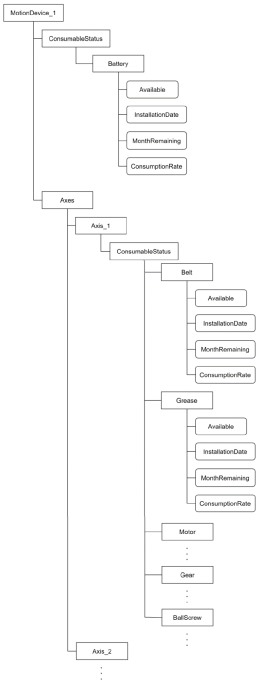
Example of address space
An example of an Address Space is shown below. When the parent nodes are [MotionDeviceIdentifier], [AxisIdentifier], and [ControllerIdentifier], it will look like this.