Connecting the Cables
WARNING
To perform the power supply lockout, remove the power plug. Be sure to connect the AC power cable to a power outlet. Do not connect it directly to a factory power source.
Before performing any replacement work, inform others in the area that you are working, and then turn off the Controller and related equipment, and unplug the power cable from the power source. Performing any work procedure with the power turned on is extremely dangerous and may result in electric shock and/or malfunction of the robot system.
Be sure to connect the cables properly. Do not put heavy objects on the cables, bend or pull on the cables forcibly, or allow the cables to be pinched. Damaged cables, broken wires, or contact failure is extremely hazardous and may result in electric shock and/or malfunction of the robot system.
The Manipulator is grounded by connecting it to the Controller. Ensure that the Controller is grounded and the cables are correctly connected. If the ground wire is improperly connected to ground, it may result in the fire or electric shock.
CAUTION
- When connecting the Manipulator and the Controller, check that the serial numbers match for each device. Improper connection between the Manipulator and the Controller may not only lead to malfunction of the robot system but also serious safety problems. The connection method between the Manipulator and the Controller varies depending on the Controller. For details on the connections, refer to the following manual.
"Controller Manual" - Connecting a G series Manipulator, E2 series Manipulator, or RS series Manipulator to a 6-Axis robot Controller can damage the Manipulator.
When the Manipulator is a model with cleanroom specifications, an exhaust system must be connected. The exhaust system is described in the following section.
Appendix A: Specifications Table
Connection procedure for Manipulator and M/C cable
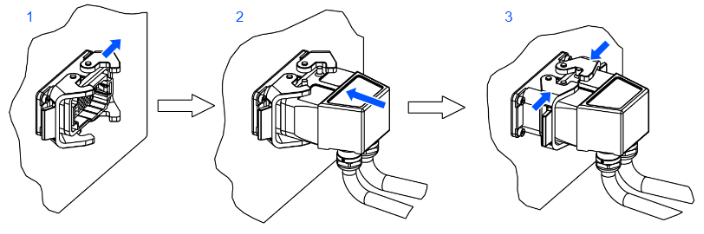
Insert the M/C cable hood into the M/C cable housing on the top of the Manipulator, and secure it with the lock attached to the housing.
Open the lock plates on both sides of the M/C cable housing.
Insert the M/C cable hood all the way to the back.
Close the lock plates on both sides of the M/C cable housing.
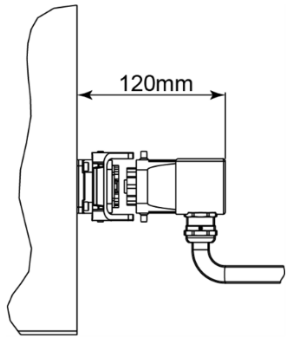
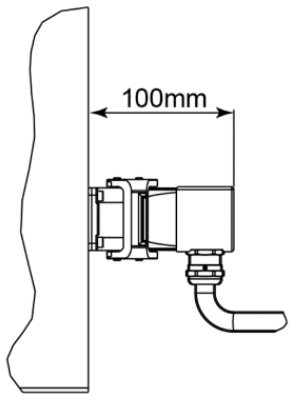
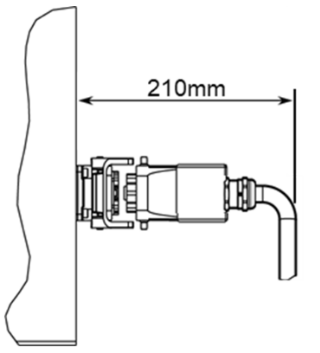
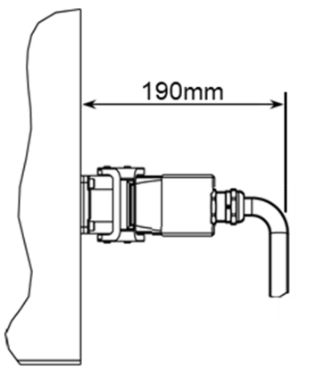
| L-shape (Standard) | Straight | ||
|---|---|---|---|
| Minimum Distance Required for Insertion and Removal | Distance When Mounted | Minimum Distance Required for Insertion and Removal | Distance When Mounted |
 |  |  |  |
Connecting the M/C cable and the Controller
Connect the power connector and signal connector of the M/C cable to the Controller.
Illustration: RS4-C351S
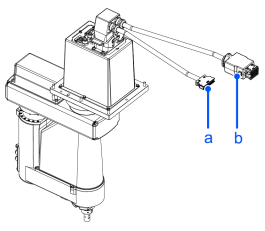
| Symbol | Description |
|---|---|
| a | M/C Signal |
| b | M/C Power Cable |
CAUTION
- When routing cables to the floor, protect them with a protector or the like. If no protection is provided, there is a risk of tripping over cables and falling.
- When connecting M/C cables, use a workbench suitable for the work. Because the work is performed at a high location, there is a risk of losing balance and falling.