From Unpacking to Installation
Safety Information for the Flow from Unpacking to Installation
Transportation and installation of the Manipulator and related equipment should be performed by people who have received installation training provided by Epson or its suppliers. Also, the laws and regulations of the installation country must be followed.
WARNING
- Only qualified personnel should perform sling work and operate a crane or a forklift. When these operations are performed by unqualified personnel, it is extremely hazardous and may result in serious bodily injury to operators and/or severe equipment damage.
CAUTION
Use a cart or the like to transport the Manipulator in the same status as it was delivered.
After removing the fixing bolts securing the Manipulator to the transportation pallet, the Manipulator can fall. Be careful not to get your hands or feet caught in between the Manipulator.
The arm is secured in place with cable ties. To prevent hands or other body parts from getting pinched in the robot arm, do not remove the cable ties until installation is complete.
The Manipulator should be transported by two or more people, either secured to transporting equipment or carried by placing their hands the shaded sections (the bottom of Arm #1 and bottom of the base).
When holding Arm #1 or the bottom of the base by hand, be extremely careful not to get your hands or fingers caught.- RS4-C351*: Approx. 16 kg (35 lb)
- RS6-C552* : Approx. 20 kg (44 lb)
If you lift up the Manipulator, put your hands on it to balance it.
When transporting the Manipulator over long distances, secure it directly to transporting equipment so that it will not fall. If necessary, pack the Manipulator using the same packaging as delivery.
CAUTION
- When installing, be sure to provide sufficient working space.
- The Manipulator must be installed in such a way that avoids interference with surrounding buildings, structures, and other machines and equipment. If not properly installed, it may collide with other machines or create a trapping hazard.
- Resonance (resonating sound or minute vibrations) may occur during Manipulator operation depending on the rigidity of the base table. If the resonance occurs, improve the rigidity of the base table or change the speed or acceleration and deceleration settings of the Manipulator.
Standard Environmental Specifications
CAUTION
Be sure to always use two or more people when relocating the Manipulator. The Manipulator weights are as follows. Be careful not to get hands or feet caught or have equipment damaged due to dropping of the Manipulator.
- RS4-C351*: Approx. 16 kg (35 lb)
- RS6-C552*: Approx. 20 kg (44 lb)
When installing the Manipulator on a ceiling or similar structure, support the Manipulator until all of the anchor bolts are secured in place. Removing the support before the anchor bolts are fully secured is extremely hazardous and may cause the Manipulator to fall.
With the arm folded, take out the Manipulator from the packing box.
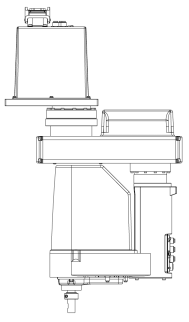
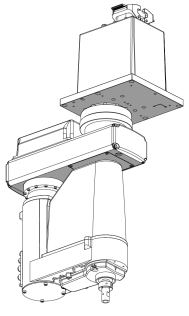
Secure the base to the base table using six bolts.
Tightening torque: 13.0 N·m (133 kgf·cm)KEY POINTS
- RS4-C351*: Remove the protective tape first.
- Use bolts with strength specifications compliant with ISO 898-1 property class: 10.9 or 12.9.
- Check the origin direction by referring to the coordinate axes listed on the base.
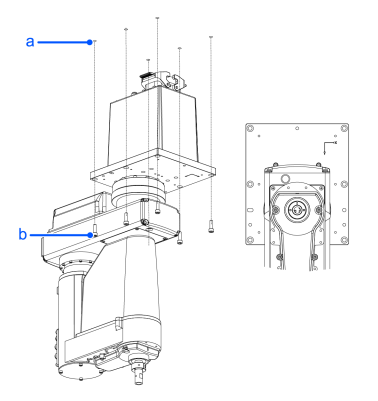
Symbol Description a Threaded hole
(12 mm or more depth)b 6 × M6 × 20 Remove the transportation fixtures.
Cleanroom model
Unpack the Manipulator outside of the cleanroom.
Lay the Manipulator down to prevent it from falling or tipping over. When doing so, place it so that stress is not applied to the shaded sections (the ball screw spline and cover sections).
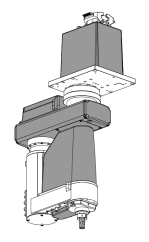
- Wipe off any dust on the Manipulator using a lint-free cloth that was dipped in ethyl alcohol or distilled water.
- Carry the Manipulator into the cleanroom.
- Refer to the installation procedure for the respective Manipulator model, and install the Manipulator.
- Connect an exhaust tube to the exhaust port.