Pallet Statement
Defines and displays pallets.
Syntax
(1) Pallet [Outside,] palletNumber, P1, P2, P3 [, P4 ], columns, rows
(2) Pallet [Outside,] palletNumber, row1/column1, row2/column2, row3/column3 [, row4/column4], columns1, rows2
(3) Pallet
Parameters
- Outside
- Optional. Allow row and column indexes outside of the range of the specified rows and columns.
- palletNumber
- Palette number (integer from 0 to 15) as an expression or numeric value.
- P1, P2, P3
- Specify the point variable to be used for the palette definition (standard 3-point definition).
- P4
- Optional. Point variable which is used with P1, P2 and P3 to define 4 point pallet.
- columns1
- Specify the number of divisions between point number 1 (row1/column1) and point number 2 (row2/column2) of the palette as an integer. Valid values are 1 to 32767. (columns1×rows2 <32767)
- rows2
- Specify the number of divisions between point number 1 (row1/column1) and point number 3 (row3/column3) of the palette as an integer. Valid values are 1 to 32767. (columns1×rows2 <32767)
- row1 to 3/column1 to 3
- Specify the coordinate system to be used for palette definition (standard 3-point definition) directly in point data.
- row4/column4
- Used together with row1 to 3/column1 to 3 for 4-point pallet definition. Optional.
Return Values
(3) Displays all defined pallets when parameters are omitted.
Description
Defines a pallet.
You can define a palette by specifying three or four points on the palette and the number of divisions.
If the pallet is a well ordered rectangular shape, only 3 of the 4 corner points need to be specified. However, in most situations it is better to use 4 corner points for defining a pallet.
To define a pallet, first teach the robot either 3 or 4 corner points, then define the pallet as follows:
A pallet defined with 4 points: P1, P2, P3 and P4 is shown below. There are 3 positions from P1-P2 and 4 positions from P1-P3.
- Normal case:
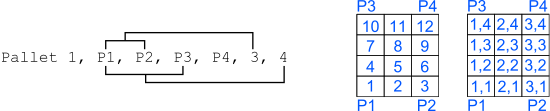
- Example of specifying point numbers:
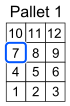
Jump to the position of the blue frame on the pallet.
  Pallet 1, P1, P2, P3, 3, 4
  Jump Pallet (1, 7)
- Example of specifying row/column:
Jump to the position of the blue frame on the pallet.
   Pallet 1, P1, P2, P3, 3, 4
   Jnmp Pallet (1, 2, 2)

If you want to access points outside the 3 or 4 points that were taught:
By specifying "Outside" as the first argument you can specify that you want to create a palette that can access outside the rows and columns. In this case, specify the position on the pallet in "row/column".

This makes a pallet which has 12 positions total. In the figure above, it starts with P1. These division numbers are also required by the Pallet Function.
For example:
Pallet Outside 1, P1, P2, P3, 3, 4
Jump Pallet(1, -2, 10)
Notes
The Maximum Pallet Size
The total number of points defined by a specific pallet must be less than 32,767.
Incorrect Pallet Shape Definitions
Be aware that incorrect order of points or incorrect number of divisions between points will result in an incorrect pallet shape definition.
Pallet Plane Definition
The pallet plane is defined by the Z axis coordinate values of the 3 corner points of the pallet. Therefore, a vertical pallet could also be defined.
Pallet Definition for a Single Row Pallet
A single row pallet can be defined with a 3 point Pallet statement or command. Simply teach a point at each end and define as follows: Specify 1 as the number of divisions between the same point.
> Pallet 2, P20, P21, P20, 5, 1 'Defines a 5D1 palletUVW Coordinate Values
When the UVW coordinate values of the 3 (or 4) points specified with the Pallet statement vary, the UVW coordinate values of the P1 and the row1/column1 are used.
P2 to P4 and the UVW coordinate values of row2 to 4/column2 to 4 are ignored.
Additional Axes Coordinate Values
When the coordinate values of the 3 (or 4) points specified with the Pallet statement include the additional ST axis coordinate values, Pallet includes these additional coordinates in the position calculations. In the case where the additional axis is used as the running axis, the motion of the running axis is considered and calculated with the Pallet definition. You need to define a pallet larger than the robot motion range considering the position of the running axis. Even if you define additional axes that are not affected by the pallet definition, be careful of the positions of additional axes when defining the pallet.
See Also
Pallet function
Pallet Statement Example
An example of setting up a palette defined by P1, P2, and P3 in the Command Window is shown below. The pallet plane comprises 12 equally distributed pallet point positions, with the pallet point numbers 1 to 3 aligned between P1 and P2. In this example, the specified palette position is position "2".
> pallet 1, P1, P2, P3, 3, 4
> jump pallet(1, 2)         'Jump to position on pallet
The resulting Pallet is shown below:
