Direct Teaching Operation (SCARA, RS series robots)
Set the joint which you want to teach to Servo Free status and move the robot directly. This operation is called “Direct Teaching”.
Move the robot to the teaching position.
Press the [F4] key to display the [Free Joint] screen in the [Jog & Teach] screen.
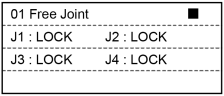
Select “LOCK” (servo lock) or “FREE” (servo free) for each joint.
- + Jog Key: LOCK for the joint
- - Jog Key: FREE for the joint
- [F1] Key: FREE for all joints
- [F2] Key: LOCK for all joints
“FREE” joint can be moved with hands.
Press the [F5] key to return to the [Jog & Teach] screen.
Move the robot arm to the teaching position manually.