TEACH mode
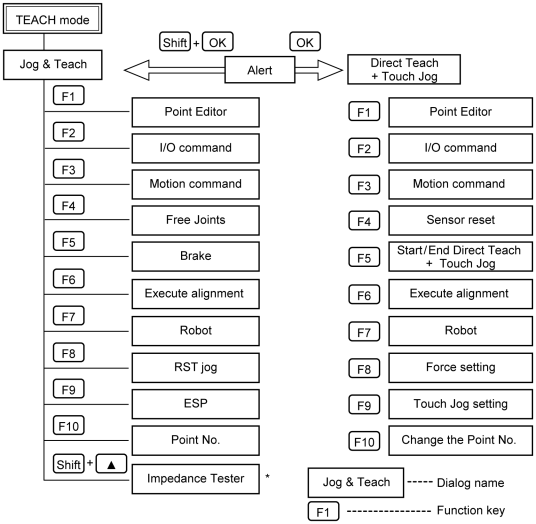
Switch the mode selector key switch to “Teach” to enter the TEACH mode. In this mode, jog, teaching, operation commands, I/O commands, and other operations and commands can be executed using the Teach Pendant. Note, however, that the program cluster cannot be executed.
KEY POINTS
A coordinate point including the arm pose is defined as “position (point),” and the data is called “point data.”
* The impedance tester is supported as default for EPSON RC+ 7.0 Ver. 7.2.0 or later, and Epson RC+ 8.0. However, the impedance tester is available only when using Epson RC+ Option Force Guide.
When not using the Force Guide, the impedance tester is not available.
Direct Teach + Touch Jog function is supported as default for EPSON RC+ 7.0 Ver.7.4.4 or later, and Epson RC+ 8.0. However, Direct Teach + Touch Jog function is available only when using Epson RC+ Option Force Guide.
When not using the Force Guide, Direct Teach + Touch Jog function is not available.