I/O Command
This section indicates settings in the [I/O Command] screen.
Execute either of the following procedures to display the screen.
- Press the [F2] key in the [Jog & Teach] screen.
- Press the [F6] key in the [Impedance Tester] screen.
- Press the [F2] key in the [Direct Teach + Touch Jog] screen.
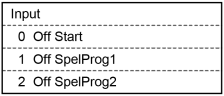
| Status | Description |
|---|---|
| On | Input bit or output bit is ON status. |
| Off | Input bit or output bit is OFF status. |
| Key operation | Description |
|---|---|
| ▲ / ▼ | In the Outputs status display, moves the cursor and selects the output bit. |
| Page Up / Down | Changes to the previous or next page. |
| OK | Returns to the previous screen. |
| Cancel | Returns to the previous screen. |
| Guide | Displays the key operation guide. |
| Press F1 while holding Enable Switch | Turns ON the selected output bit. |
| Press F2 while holding Enable Switch | Turns OFF the selected output bit. |
| F3 | Switches between the Inputs / Outputs status display. |
| F5 | Returns to the previous screen. |