Switch to [Direct Teach + Touch Jog] screen
CAUTION
Executing the Direct Teach or Touch Jog function with improper settings of the Force Sensor, coordinate transformation, and gravity compensation may result in unintended motion. Be careful when configuring the settings and check operation before executing the Direct Teach or Touch Jog function.
Switch the [Jog & Teach] screen to the [Direct Teach + Touch Jog] screen.
First, check the preset settings.
Press the [Shift] key, then press the [OK] key in the [Jog & Teach] screen. The following screen appears.
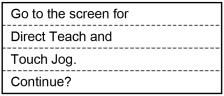
Perform either of the following steps.
Press the [OK] key.
Switch to the [Direct Teach + Touch Jog] screen.
Press the [Cancel] key.
Returns to the [Jog & Teach] screen.
CAUTION
Be sure to start the Direct Teach or Touch Jog function with no external force applied to it.
Direct Teach or Touch Jog function automatically reset the force sensor when starting the operation. If the Direct Teach or Touch Jog function is executed with an external force applied to it and the force sensor is reset, the state in which an external force applied is “0”. Therefore, if the force applied is removed, the Force Sensor detects a force even if no force is applied.
If the Direct Teach or Touch Jog function is executed in this state, the robot may move unintentionally. Caution is required in this regard.
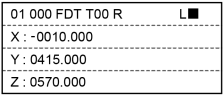
[Direct Teach +Touch Jog] screen
Header
| 01 | Robot Number |
| 000 | Point Number |
| F | Motion direction Free Line Plane Rotation |
| DT | Operation mode Direct Teach + Touch Jog Direct Teach Touch Jog |
| T00 | Tool number |
| R | Operation starts status R: Operable |
| L | Jog distance for Touch Jog Long Medium Short |
| ■ | Motor ■ : On |
| Key operation | Description |
|---|---|
| Jog keys | Not in use. |
| Reset | Executes Reset. |
| Motor | Turns ON / OFF the motor. |
| Teach | Executes a Teach operation. For details, refer to the following: |
| Speed | Not in use. |
| Mode | Switches the modes (Direct Teach + Touch Jog, Direct Teach, Touch Jog). |
| Dist | Switches the Jog Distance for Touch Jog (Long, Medium, Short). |
| Home | Execute a Home operation. |
| Save | Saves a point file. For details, refer to the following: |
| Load | Loads a point file. For details, refer to the following: |
| ▲ / ▼ | Adds / subtracts point number by one. |
| ◀ / ▶ | Subtracts / adds point number by ten. |
| Local | Switches to Local number input mode. |
| Tool | Switches to Tool number input mode. |
| Arm | Switches to Arm number input mode. |
| User Dist | Not in use. |
| Guide | Displays the key operation guide. |
| Page Up / Down | Changes to the previous or next page. |
| F1 | Changes to the point editing screen. |
| F2 | Changes to the I/O command screen. |
| F3 | Changes to the motion command screen. |
| F4 | Changes to the reset screen of the force sensor. For details, refer to the following: |
| F5 | Sets the Direct Teach or Touch Jog operations to run. For details, refer to the following: |
| F6 | Changes to the Alignment execution screen. For details, refer to the following: |
| F7 | Changes to the robot screen. For details, refer to the following: |
| F8 | Changes to the force setting screen. For details, refer to the following: |
| F9 | Changes to the Touch Jog setting screen. For details, refer to the following: |
| F10 | Changes to the point number input mode. |