Arc3
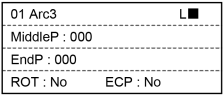
This section indicates settings in the command advanced setting screen.
| Key operation | Description |
|---|---|
| OK | Fixes the parameter setting and displays the execution confirmation screen. |
| Cancel | Returns to the motion command selection screen. |
| Motor | Turns ON / OFF the motor. |
| Speed | Switches the Speed (Low / High). |
| Reset | Executes Reset. |
| Guide | Displays the key operation guide. |
| F1 | MiddleP: Switches to the Middle Point number input mode. |
| F2 | EndP: Switches to the End Point number input mode. |
| F3 | ROT: Switches between Enabled (Yes) and Disenabled (No). |
| F4 | ECP: Switches between Enabled (Yes) and Disenabled (No). |