Motor ON / OFF
This can be executed at any time when the motor status is displayed in the impedance tester.
Turning ON the motor:
Press the [Motor] key.
Press the [OK] key while holding the enable switch in the confirmation screen.
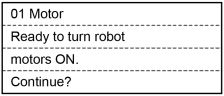
Robot motor is turned ON and the display changes as below.

Turning OFF the motor
Press the [Motor] key.
Robot motor is turned OFF and the display changes as below.

KEY POINTS
Perform the following operations to turn OFF the motor.
- Turn OFF the enable switch
- Switch the mode with the mode switching key switch
When switching from TEACH mode to AUTO mode, the latch must be released.
Turn OFF enable switch, when you switch the mode with the mode switching key switch.
If the mode is switched with the mode switching key switch while the enable switch is turned ON, and the motor is turned ON, an error will occur. Be sure to turn the enable switch OFF once and then ON again before turning the motor ON.