Displaying Details of Force Control Object Number and Force Coordinate System object Number
To check force control object settings:
Press the[F4] key in the force control object number input mode and display the force control object number advanced setting information.
To check Force Coordinate system object settings:
Press the [F1] key in the force control object number advanced setting information and display the force coordinate system object number advanced setting information.
Press the [F2] key.
It turns to the force control object number input mode.

Press the [F4] key.
It displays the force control object number advanced setting information.
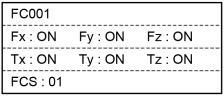
| Screen | Description |
|---|---|
| FC001 | Displays the currently selected force control object number. |
| Fx:ON | Displays whether the X-axis for the force in the direction of translation is enabled or disabled. Enable: ON, Disable: OFF |
| Fy:ON | Displays whether the Y-axis for the force in the direction of translation is enabled or disabled. Enable: ON, Disable: OFF |
| Fz:ON | Displays whether the Z-axis for the force in the direction of translation is enabled or disabled. Enable: ON, Disable: OFF |
| Tx:ON | Displays whether the X-axis for the force in the direction of rotation is enabled or disabled. Enable: ON, Disable: OFF |
| Ty:ON | Displays whether the Y-axis for the force in the direction of rotation is enabled or disabled. Enable: ON, Disable: OFF |
| Tz:ON | Displays whether the Z-axis for the force in the direction of rotation is enabled or disabled. Enable: ON, Disable: OFF |
| FCS:01 | Displays the currently selected force coordinate system object number |
Press the [F1] key.
It displays the force coordinate system object number advanced setting information.
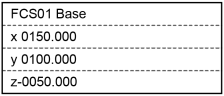
- If Base is selected for the Force coordinate system object:
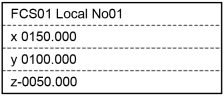
- If Local is selected for the Force coordinate system object:
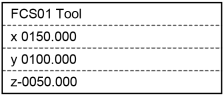
- If Tool is selected for the Force coordinate system object:
- If Custom is selected for the Force coordinate system object:
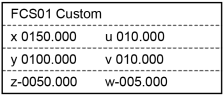
| Screen | Description |
|---|---|
| FCS01 | Displays the currently selected force coordinate system object number. |
| Base | Indicates that Base is selected for the Force coordinate system object. |
| Local | Indicates that Local is selected for the Force coordinate system object. |
| Tool | Indicates that Tool is selected for the Force coordinate system object. |
| Custom | Indicates that Custom is selected for the Force coordinate system object. |
| No01 | Displays the Local number when Local is selected. |
| x 0150.000 | Displays the X direction position of the force coordinate system object in the force coordinate system. (Unit: mm) |
| y 0100.000 | Displays the Y direction position of the force coordinate system object in the force coordinate system. (Unit: mm) |
| z-0050.000 | Displays the Z direction position of the force coordinate system object in the force coordinate system. (Unit: mm) |
| u 010.000 | U-axis rotation for relative posture when Custom is selected. (Unit: deg) |
| v 010.000 | V-axis rotation for relative posture when Custom is selected. (Unit: deg) |
| w-005.000 | W-axis rotation for relative posture when Custom is selected. (Unit: deg) |
Press the [F5] key.
It returns to the force control object number advanced setting information.
Press the [F5] key.
It returns to the force control object number input mode.
Press either [OK] or [Cancel] key to return to the [Impedance Tester] screen.