Editing Point Data
The following describes how to edit the point data.
Changing Point Number
Press the [F1] key.
It turns to the point number input mode.

Input a number.
Press the [OK] key and fix the change of the point number.
Changing Coordinate Value
Move the cursor to the target coordinate and press the [F3] key.
It turns to the coordinate value input mode.
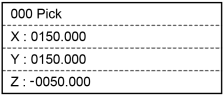
Input a number.
Press the [-] [+] keys to change the sign.
Press the [OK] key to change the coordinate value.
Changing Local Number
Press the [F2] key in the screen that displays the local number.
It turns to the local number input mode.

Input a number.
Press the [OK] key and fix the change of the local number.
Changing Pose Flag
Move the cursor to “Hand”.
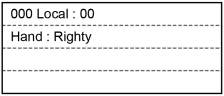
Press the [◀] or [▶] key to change the flag.
Press the [OK] key and fix the change of the Hand flag.
Registering Point Data
Press the [OK] key to apply in the memory.