Jog & Teach
This section indicates settings in the [Jog & Teach] screen.
Switch the mode selector key switch to “Teach” to display the following screen.
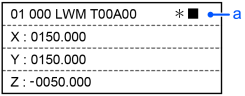
a: Header
| 01 | Robot Number |
| 000 | Point Number |
| L | Speed Low High |
| W | Jog Mode World Tool Local Joint ECP |
| M | Jog Distance Long Medium Short User Cont |
| T00 | Tool Number |
| A00 | Arm Number |
| * | RST Jog |
| ■ | Motor ■:On |
| Key operation | Description |
|---|---|
| Jog keys | Executes jog motion. |
| Reset | Executes Reset. |
| Motor | Turns ON / OFF the motor. |
| Teach | Executes a Teach operation. For details, refer to the following: |
| Speed | Switches the Speed (Low / High). |
| Mode | Switches the Jog Mode (World / Tool / Local / Joint / ECP). |
| Dist | Switches the Jog Distance (Long / Medium / Short / User / Cont). |
| Home | Execute a Home operation. |
| Save | Saves a point file. For details, refer to the following: |
| Load | Loads a point file. For details, refer to the following: |
| ▲ / ▼ | Adds / subtracts point number by one. |
| ◀ / ▶ | Subtracts / adds point number by ten. |
| Local | Switches to Local number input mode. |
| Tool | Switches to Tool number input mode. |
| Arm | Switches to Arm number input mode. |
| User Dist | Switches to User Dist number input mode. |
| Guide | Displays the key operation guide. |
| Page Up / Down | Changes to the previous or next page. |
| F1 | Changes to the point editing screen. |
| F2 | Changes to the I/O command screen. |
| F3 | Changes to the motion command screen. |
| F4 | Changes to the Free Joint screen. |
| F5 | Changes to the Brake screen. (6 axis robot only) |
| F6 | Changes to the Alignment execution screen. For details, refer to the following: |
| F7 | Changes to the robot screen. |
| F8 | Switches between U, V, and W jog keys and R, S, and T jog keys. |
| F9 | (When the ECP option is enabled.) Switches to ECP number input mode. |
| F10 | Changes to the point number input mode. |