Executing Direct Teach or Touch Jog
Use Direct Teach or Touch Jog to move the end effector instinctively. Be sure to reset the force sensor before executing Direct Teach or Touch Jog.
For how to reset the force sensor, refer to the following.
| Key operation | Description |
|---|---|
| Jog keys | Not in use. |
| Reset | Executes Reset. |
| Motor | Turns ON / OFF the motor. |
| Teach | Executes a Teach operation. For details, refer to the following: |
| Speed | Not in use. |
| Mode | Switches the modes (Direct Teach + Touch Jog, Direct Teach, Touch Jog). |
| Dist | Switches the Jog Distance for Touch Jog (Long, Medium, Short). |
| Home | Execute a Home operation. |
| Save | Saves a point file. For details, refer to the following: |
| Load | Loads a point file. For details, refer to the following: |
| ▲ / ▼ | Adds / subtracts point number by one. |
| ◀ / ▶ | Subtracts / adds point number by ten. |
| Local | Switches to Local number input mode. |
| Tool | Switches to Tool number input mode. |
| Arm | Switches to Arm number input mode. |
| User Dist | Not in use. |
| Guide | Displays the key operation guide. |
| Page Up / Down | Changes to the previous or next page. |
| F1 | Changes to the point editing screen. |
| F2 | Changes to the I/O command screen. |
| F3 | Changes to the motion command screen. |
| F4 | Changes to the reset screen of the force sensor. For details, refer to the following: |
| F5 | Start or end the Direct Teach or Touch Jog operations. For details, refer to the following: |
| F6 | Changes to the GoAlignHere execution screen. For details, refer to the following: |
| F7 | Changes to the robot screen. For details, refer to the following: |
| F8 | Changes to the force setting screen. For details, refer to the following: |
| F9 | Changes to the Touch Jog setting screen. For details, refer to the following: |
| F10 | Changes to the point number input mode. |
Click the [F5] key to set Direct Teach or Touch Jog to ready for operation.
First, the following screen is displayed.
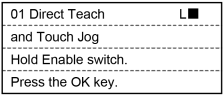
Press the [OK] key to set Direct Teach or Touch Jog to ready for operation. Hold the enable switch to turn the motor on. When it is available, “R” is displayed on the header.
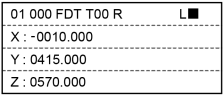
Execute Direct Teach or Touch Jog while holding the enable switch.
While the Direct Teach or Touch Jog is operating, “Executing…” is displayed on the header and any key operations of TP2 is disabled.
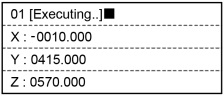
To perform point teaching or change parameters, release the hand from the enable switch. When you want to execute the Direct Teach or Touch Jog again, start from 1.
Use Direct Teach and Touch Jog differently depending on the applied force to the force sensor.
Apply weak force to the force sensor or apply force for a moment to the force sensor:
Execute Touch Jog and the end effector move by the set jog amount. (Motion which is same as Step jog operation).
Apply strong force to the force sensor:
Execute Direct Teach and the end effector moves according to the set hardness of Direct Teach. (Motion which is same as Continuous jog operation).
Do not apply force to the force sensor:
The end effector does not move.
If Direct Teach is operating, end the operation.
TIP
You can change the Touch Jog sensitivity and Direct Teach hardness.
For more details, refer to the following sections:
- Setting Direct Teach (Force Setting) - [Changing the hardness of Direct Teach]
- Setting Touch Jog - [Setting the sensitivity of Touch Jog]
CAUTION
Apply the force to the hand or workpiece which is attached near the tip than the Force Sensor.
The Force Sensor cannot detect the force when it is applied to the robot arm or the Force Sensor itself, and it may result in unintended robot motion. Caution is required in this regard.
When operating the robot, pay attention not only to the position of the hand or workpiece, but also to the movement of the robot arm.
Especially when the robot is near the singularity, the robot arm may move significantly. Caution is required in this regard.
When using Direct Teach, be sure to verify that the setting of jog distance for Touch Jog is as intended before use. If you make an incorrect setting, the robot may move more than expected, possibly results in a collision. Caution is required in this regard.
Motion near the singular point
Direct Teach function is not available near the singular point. Only use Touch Jog function to move the end effector.
The following screen appears when the end effector gets in the singular point, and the robot operation is paused.
TP2 alerts a warning sound at the same time.
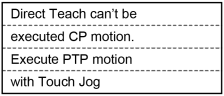
Press the [OK] key to disappear the display and rerun to the [Direct Teach + Touch Jog] screen.
Confirm that Touch Jog function is enabled on the the header and execute Touch Jog.
Header display when Touch Jog is enabled:

Or

TIP
When near the singular point and Touch Jog is disabled, the end effector cannot be moved.
For operations to enable Touch Jog function, refer to the following.
When the robot moves from the singular point, the following screen is displayed, and the robot operation is paused.
The warning sound will be stopped at the same time.
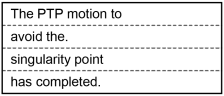
Press the [OK] key to disappear the display and rerun to the [Direct Teach + Touch Jog] screen.
Now, Direct Teach function is available.