Executing MCal
Press the [Shift] key and switch the function key from [F6] to [F10].
Press [F7].
The [Robot] screen is displayed.
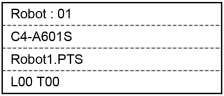
Press [F4].
The following screen will be displayed.
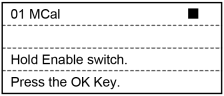
Holding down the Enable Switch, press the [OK] key and execute MCal.
After the robot moves to its home position, the screen returns to [Robot].
Press the [OK] key.
Returns to the [Jog & Teach] screen.