Changing Outputs Bit
Press the [F3] key to display the “Output” status.
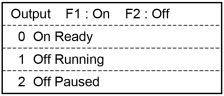
Move the cursor to the output bit that you want to change.
Holding down the Enable Switch, press the [F1] or [F2] key to switch the ON / OFF status of the output bit.
A warning appears if you switch the ON / OFF status of the output bit without holding down the Enable Switch.