Free Joint
This section indicates settings in the [Free Joint] screen.
Press the [F4] key in the [Jog & Teach] screen. The following screen appears.
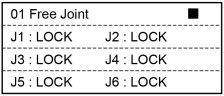
| Status | Description |
|---|---|
| Free | Servo Free for the joint |
| Lock | Servo Lock for the joint |
| (Blank) | Invalid joint |
| Key operation | Description |
|---|---|
| - Jog keys | Servo Free for the joint. |
| + Jog key | Servo Lock for the joint. |
| Page Up / Down | Changes to the previous or next page. |
| OK | Returns to the [Jog & Teach] screen. |
| Cancel | Returns to the [Jog & Teach] screen. |
| Reset | Executes Reset. |
| Motor | Turns ON / OFF the motor. |
| Guide | Displays the key operation guide. |
| F1 | Changes all joints to FREE (servo free) status. |
| F2 | Changes all joints to LOCK (servo lock) status. |
| F3 | Switches between J4, J5, and J6 jog keys and J7, J8, and J9 jog keys. |
| F5 | Returns to the [Jog & Teach] screen. |