Executing Alignment
Move the end effector to parallel with the set working plane.
| Key operation | Description |
|---|---|
| [Numeric keys] | (Available in the number input mode. Inputs a number.) |
| CLR | (Available in the number input mode. Clears the number to 0.) |
| Motor | Turns ON / OFF the motor. |
| Speed | Switches the Speed (Low / High). |
| OK | Switches to the [Alignment Execution] screen. |
| Cancel | Returns to the [Jog & Teach] screen. |
| F3 | Switches to the local coordinate system input mode. |
| F5 | Returns to the [Jog & Teach] screen. |
Press the [Shift] key and switch the function key from [F6] to [F10].
Press the [F6] key and switch to the preparation screen for Alignment.
Using [Numeric keys], input the local coordinate system which is a target of Alignment.
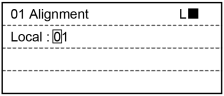
Press the [OK] key and switch to the [Alignment Execution] screen.
Check the local coordinate system which is a target of Alignment.
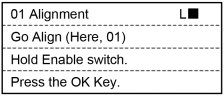
Press the [OK] key while holding the enable switch.
Execute Alignment.
When Alignment ends, return to the [Jog & Teach] screen.