Resetting Force Sensor
Epson’s Force Sensors have a drift characteristic. Therefore, if a time passes, the sensor may move even if the force is not applied to it when executing the Direct Teach or Touch Jog due to the drift errors.
If the sensor drift errors are accumulated, press the [F4] key to reset the sensor.
The Force Sensor can be reset at any time if Direct Teach or Touch Jog has not been executed.
Executing the Direct Teach or Touch Jog without resetting for 10 or more minutes, an error occurs.
Press the [F4] key.
Switch to the sensor reset screen.
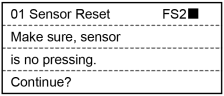
The screen confirms with the user that the hand or workpiece at the end of the Force Sensor do not touch other object since it may apply external force to the force sensor.
Perform either of the following steps.
When executing sensor reset: Press the [OK] key.
Return to the [Direct Teach + Touch Jog] screen after executing sensor reset.
When not executing sensor reset: Press the [Cancel] key.
Return to the [Direct Teach + Touch Jog] screen.
CAUTION
Be sure to reset the Force Sensor with no external force applied to it.
If it is reset with an external force applied to it, the state in which an external force applied is “0”. Therefore, if the force applied is removed, the Force Sensor detects a force even if no force is applied.
If Direct Teach or Touch Jog is performed in this state, the robot may move unintentionally. Caution is required in this regard.