Robot
Robots to perform Jog can be changed in the [Robot] screen.
Execute either of the following procedures to display the screen.
Press the [F7] key in the [Jog & Teach] screen.
Press the [F3] key in the [Direct Teach + Touch Jog] screen.
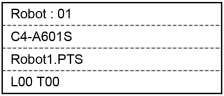
Robot number, model name, current point file name, Local number, Tool number, Arm number, and ECP number of the robot are displayed.
| Key operation | Description |
|---|---|
| ▲▼◀▶ | Changes the robot. |
| OK | Sets the robot and returns to the previous screen. |
| Cancel | Restore the robot to the setting before the change and returns to the previous screen. |
| Reset | Executes Reset. |
| Motor | Turns ON / OFF the motor. |
| Guide | Displays the key operation guide. |
| F1 | The mode will change to the robot number input mode. |
| F4 | Executes MCal. |
| F5 | Sets the robot and returns to the previous screen. |