Executing Impedance Test
To experience the configured parameters for the force control object, press the [OK] key while holding the enable switch. The impedance test will start.
Press the [OK] key while holding the enable switch.
Display the impedance test execution start confirmation screen.
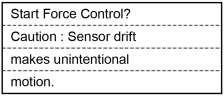
The screen cautions the user before executing the test that the robot may move with no force being applied when the sensor drift is accumulated.
[Guide] key: Displays the key operation guide for this screen.
Perform either of the following steps.
To start the impedance test:
Press the [OK] key.
When robot motors are ON:
The impedance test will start.
[Executing FCxxx] will be displayed in the fourth line to indicate that the impedance test is in process, and then the screen returns to the [Impedance Tester] screen.
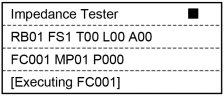
You can directly touch the tip of the Force Sensor to experience the parameters for the force control object.
CAUTION
Apply the force to the hand or workpiece which is attached near the tip than the Force Sensor.
The Force Sensor cannot detect the force when it is applied to the robot arm or the Force Sensor itself, and it may result in unintended robot motion. Caution is required in this regard.
When robot motors are OFF:
The [Motor Off notification] screen appears.
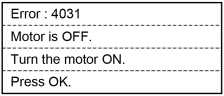
To return to the previous screen, press the [OK] key.
To not start the impedance test:
Press the [Cancel] key to return to the [Impedance Tester] screen.
To finish the impedance test, hold down or release the enable switch.
The message [Executing FCxxx] in the fourth line will disappear.
