Teaching Operation
Apply the Robot position to the specified point number.
KEY POINTS
A coordinate point including the arm pose is defined as “position (point),” and the data is called “point data.”
Specify the point number you want to teach by pressing the [▲] [▼] keys in the [Jog & Teach] screen or the [Direct Teach + Touch Jog] screen.
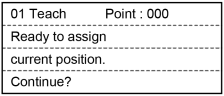
Press the [Teach] key. The following screen will be displayed.
When a point data is already registered in the specified point number, the following screen appears.
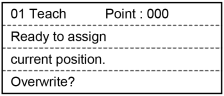
Press the [OK] key to assign the Robot position in the specified point number.
Press the [Save] key to display the [SavePoints] screen.
Press the [OK] key in the [SavePoints] screen to save the taught point data in the point file.
KEY POINTS
In the [SavePoints] screen, if you press the [Cancel] key, it does not save the file and returns to the [Jog & Teach] screen or the [Direct Teach + Touch Jog] screen.