License Activation (Online Authentication)
After installing Epson RC+8.0, you will be prompted to enter the license key when first launching the software.
Start the Epson RC+ 8.0 software.
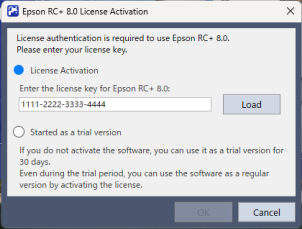
On the License Activation screen, enter in the license key as described below and click the [OK] button.
- Enter the license key in directly.
- Click the [Load] button, and then select the license key PDF file.
KEY POINTS
Select [Started as a trial version] to use functions equivalent to Epson RC+ Premium Edition for 30 days.
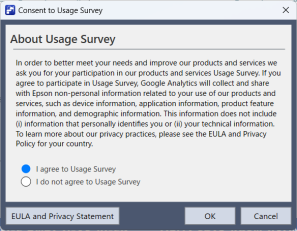
On the Usage Survey Consent screen, select either [Agree to the usage survey] or [Do not agree to the usage survey], and then click the [OK] button.
- I agree to the usage survey: Epson RC+ 8.0 usage data is collected.
- I do not agree to the usage survey: Epson RC+ 8.0 usage data is not collected.
KEY POINTS
“Usage data” is a collection of operation logs and user settings. No confidential or personal information is collected. For details on the information collected and how it is used, please refer to the "Privacy Statement".
Your license will be activated.
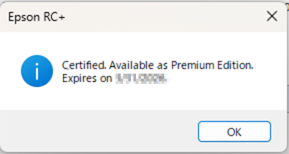
If license activation is successful, you will be greeted with a message with the edition available for use, and the expiration date (YYYYY/MM/DD).
Restart the Epson RC+ 8.0 software.
KEY POINTS
After license activation, a guide screen on special offers will be displayed which may allow you to use additional special offers. For details on the terms of use of additional special offers, contact the supplier.