Ethernet Communications
KEY POINTS
The robot controller does not support internet protocol version 6 (TCP/IPv6). When you connect the development PC to the robot controller using the Ethernet, make sure to use internet protocol version 4 (TCP/IPv4).
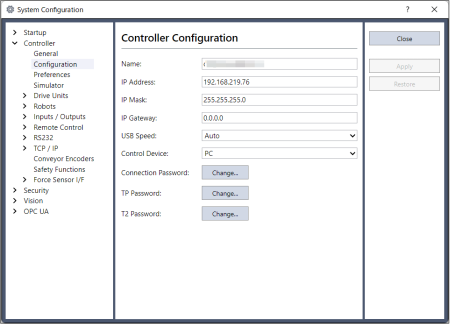
You can communicate with one or more Controllers from one PC using Ethernet. For Ethernet communications, each Controller must have a unique IP address. You can set the IP address, mask, and gateway for the controller from [Setup]-[System Configuration]-[Controller]-[Configuration]. The gateway setting is only required if you will be accessing the controller from outside of the local network.
You can connect the controller directly to a PC using an Ethernet cable. Alternatively, you can connect the PC and controller to an Ethernet switch or hub.
Before you can communicate with a controller using Ethernet, you must configure the controller's IP address, IP mask, and IP gateway. This is accomplished by first connecting to the controller with USB, and then from the Epson RC+ 8.0 [Setup]-[System Configuration]-[Controller]-[Configuration] page, set the IP address, IP mask, and IP gateway of the controller as shown below.
The following is the configuration of the controller at the time of shipment.
- IP Address: 192.168.0.1
- Subnet Mask: 255.255.255.0
- IP Gateway: 0.0.0.0
Use the USB connection to configure Ethernet communications.
In Ethernet communication, the connection method differs depending on the Controller series. Use the [New Controller Connection] window to set up.

If an error dialog is displayed when connecting, check the Controller to which you are connecting and change the Controller series if necessary.