Usage example
If you want to turn ON the bit port 9 of the standard I/O for 500 ms when the bit port 0 of the standard I/O input is ON and the bit port 1 is OFF:
User definition
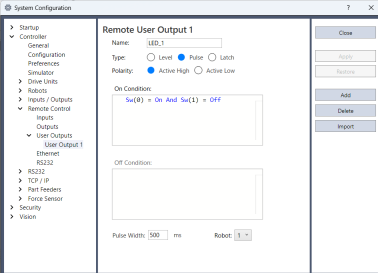
Check that output bit port 9 used in [System Configuration]-[Controller]-[Remote Control]-[Output] is not assigned to another output signal. If it is in use, set the output bit for the signal to [Unused], or change it to another bit.
Set the name. In this case, set "LED_1" for the [Name]. Change the setting if necessary.
Select [Pulse] for [Type].
Select [Active High] for [Polarity] in order to output ON.
Set [On condition]. In this example, set the following condition expression.
Sw(0) = On And Sw(1) = OffSet “500” for [Pulse Width].
Click the [Apply] button.
Setting in the [Remote Control Outputs]
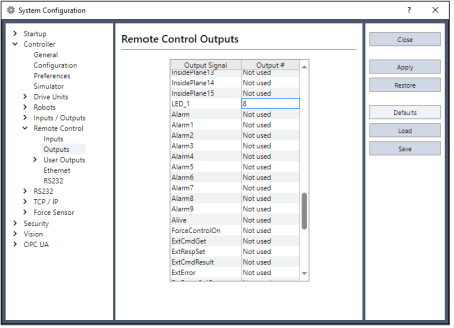
- Select the output bit “9” for the configured name (LED_1).
- Click the [Apply] button.
Now, output to the I/O will be executed according to the condition expression after rebooting.