Place at
A combined command that moves the robot arm to the destination and releasing a work from hand.
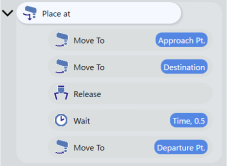
Contents of command
| Command | Label | Operation |
|---|---|---|
| Move To | Approach Pt. | Move with PTP motion to approaching point |
| Move To | Destination | Move straight to destination point |
| Release | - | Release a work |
| Wait | Time, 0.5 | Waits 0.5seconds |
| Move To | Departure Pt. | Move straight to departure point |
Detailed Settings
Destination
Select based point of destination. Point
Point
Move to the destination coordinates set via jog and teach or direct input.
How to Check the Robot Motion
KEY POINTS
Available to name the point (up to 127 characters).
The names you assign will be displayed on the simulator, which is convenient for checking the taught positions. Pallet
Select the palette to use as the reference position from the pull-down list.
You can create and configure palettes from the gear button.
For details on palette definitions, refer to the manual below.
Epson RC+ 8.0 User’s Guide - [Tools]-[Robot Manager]-[Pallets] Page Point file
Tap [Point File] and select the point you want to set as your destination from the list of point files.
Waypoint
This setting determines the distance from the waypoints the robot will pass through when executing the "Place at" command to the target location.
When “Use the [Settings] value.” is selected from pull down list, the value set in the Settings is used.
Setting a Program OperationDecompose commands
Tapping the [Edit] button allows you to break down a group of "Place at" commands into a sequence of regular commands.
This is used when you want to make detailed settings that are not possible with just the "Place at" command settings.
Once you tapped, and edited commands, you can not restore the original settings.