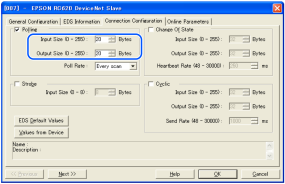
Editing of Input / Output Size
You can change the input/output size of DeviceNet slave board. Change parameters as necessary.
Select [Setup] - [System Configuration] and display the [System Configuration] dialog box.
Select [Controller] - [Inputs / Outputs] - [Fieldbus Slave] - [General].

Change the settings of [Input Byte] and [Output Byte]. In this example, both of them are changed to "20" Bytes.

Click [Apply].
Click [Close].
The following dialog box appears and the Controller automatically starts rebooting.
Select [Setup] - [System Configuration] and display the [System Configuration] dialog box.
Select [Controller] - [Inputs / Outputs].

Confirm that the following items are displayed in "Fieldbus slave".
Inputs: "512" - "512 + Changed number of input (Bits)"
Outputs: "512" - "512 + Changed number of output (Bits)"In this example, Input byte is 20 bytes (160 bits) and 512-671 is displayed in Inputs.
Also, Output byte is 20 bytes (160 bits) and 512-671 is displayed in Outputs.Click [Close].
KEY POINTS
When you change the input/output size of DeviceNet slave board, you need to change the input/output size of the slave information registered in the Fieldbus master device.
Use the window below to change the input/output size of the slave information registered in the Fieldbus master device by the applicomIO Console application.