Confirmation of Epson RC+ 8.0
When the DeviceNet slave module is installed to the Controller, it is recognized automatically. Confirm that Epson RC+ 8.0 has recognized the module in the following procedure.
Select [Setup] - [System Configuration] and display the [System Configuration] dialog box.
Select [Controller] - [Inputs / Outputs].
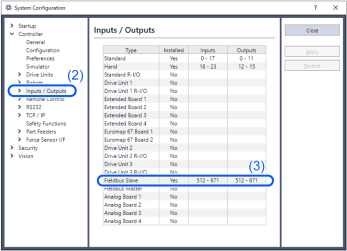
Confirm that the following items are displayed in "Fieldbus slave".
Installed: Yes
Inputs: 512-767 (default setting)
Outputs: 512-767 (default setting)Select [Fieldbus Slave] - [General]
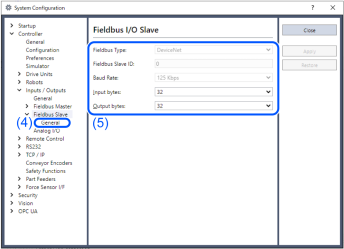
Confirm that following items are displayed.
Fieldbus Type: DeviceNet
Node Address Configure switch Node address
Baud Rate Configure switch baud rate
Input Bytes: 32 (default setting)
Output Bytes: 32 (default setting)Click [Close].