Arm Movement Method in the Emergency Stop State
When the system is placed in emergency mode, push the arm or joint of the Manipulator by hand as shown below:
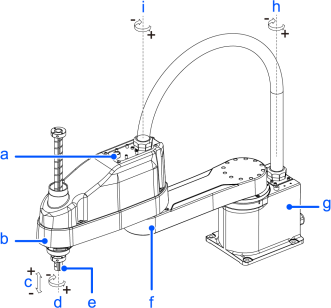
(Figure: LA6-A602S)
| Symbol | Description |
|---|---|
| a | Joint #3 brake release switch |
| b | Arm #2 |
| c | Joint #3 (up and down) |
| d | Joint #4 (rotating) |
| e | Shaft |
| f | Arm #1 |
| g | Base |
| h | Joint #1 (rotating) |
| i | Joint #2 (rotating) |
- Arm #1: Push the arm by hand.
- Arm #2: Push the arm by hand.
- Joint #3: The joint cannot be moved up/down by hand until the electromagnetic brake applied to the joint has been released. Move the Arm while pressing down the brake release switch.
- Joint #4: Rotate the shaft by hand.
KEY POINTS
When the brake release switch is pressed in emergency mode, the brake for Joint #3 is released. Be careful of the shaft falling and rotating while the brake release switch is pressed because the shaft and the support shaft may be lowered by the weight of an end effector.