AccelS Setting for CP Motion
To make the Manipulator move in a CP motion, make the appropriate AccelS settings in the SPEL program based on the tip load and Z-axis height.
KEY POINTS
If the AccelS settings are not properly configured, the following problems may occur.
- Shortened lifespan and damage to the ball screw spline
Set AccelS as shown below based on the Z-axis height.
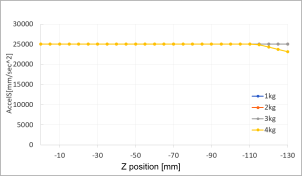
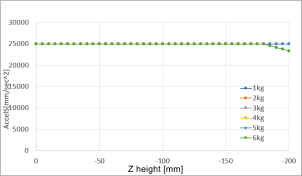
AccelS setting values by the Z-axis height and tip load
RS4-C
Maximum AccelS correction values by the Z-axis height and tip load
RS6-C
Maximum AccelS correction values by the Z-axis height and tip load
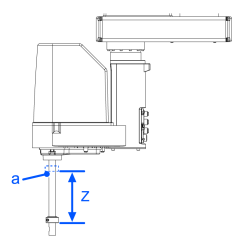
| Symbol | Description |
|---|---|
| a | Z-axis height 0 (origin position) |
Also, if a CP motion was performed with incorrect values set, check the following point.
- No deformation or bending of the shaft of the ball screw spline