Editing of Input / Output Size
You can change the input/output size of PROFIBUS-DP slave board. Change parameters as necessary.
Select [Setup] - [System Configuration] and display the [System Configuration] dialog box.
Select [Controller] - [Inputs / Outputs] - [Fieldbus Slave] - [General].

Change the settings of [Input Byte] and [Output Byte].
In this example, both of them are changed to "20" Bytes.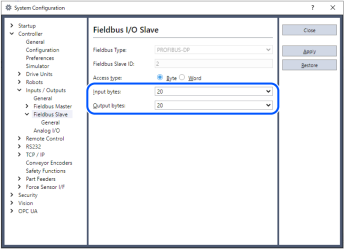
The sum of input and output data sizes is restricted as follows:
For Byte format: 372 bytes
For Word format: 208 wordsClick [Apply].
Click [Close].
The following dialog box appears and the Controller automatically starts rebooting.
Select [Setup] - [System Configuration] and display the [System Configuration] dialog box.
Select [Controller] - [Inputs / Outputs].
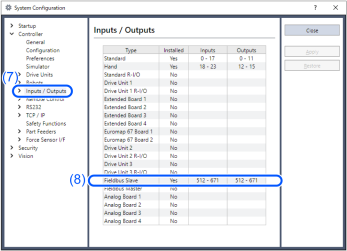
Confirm that the following items are displayed in "Fieldbus slave".
Inputs: "512" - "512 + Changed number of input I/O (Bits)"
Outputs: "512" - "512 + Changed number of output I/O (Bits)"In this example, Input byte is 20 bytes (160 bits) and 512-671 is displayed in Inputs.
Also, Output byte is 20 bytes (160 bits) and 512-671 is displayed in Outputs.
KEY POINTS
When you change the input/output size of PROFIBUS-DP slave board, you need to change the input/output size of the slave information registered in the Fieldbus master device.
Make sure to add the output modules first, and then, add the input modules.
Use the window below to change the input/output size of the slave information registered in the Fieldbus master device by the applicomIO Console application.
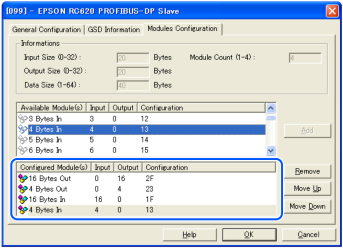
| 16 Bytes Out | Outputs: 20 Bytes |
| 4 Bytes Out | |
| 16 Bytes In | Inputs: 20 Bytes |
| 4 Bytes In |