SetOperationMode
There are no restrictions on the input/output parameters of this command.
Warning
When switching the operation mode from "T1 External" to "Auto External" by operating the pendant (an HMI equipped with an emergency stop and Enable switch), configure the system so that SetOperationMode is executed only after confirming that switching authorization has been granted by another confirmation device installed outside the safety protection space. An example of device configuration and control is shown below.
If the robot is operated by switching the operation mode to "Auto External" without confirming that the operator is outside the safety protection space, the robot will operate at a high speed, which can be very dangerous, causing severe injury or serious damage.
Example of device configuration and control
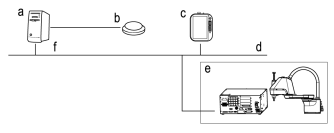
| Symbol | Description |
|---|---|
| a | PLC |
| b | Switch installed outside the safety protection space |
| c | HMI |
| d | Filedbus |
| e | Safety protection space |
| f | I/O control module |
- Connect the I/O control module to the PLC, and connect the signal from the switch installed outside the safety protection space to the I/O control module.
- When the operation mode is switched from "T1 External" to "Auto External" with a pendant (HMI), if the pressed state of the switch can be confirmed from the system control software and it can be determined that the operator is outside the safety protection space, run the SetOperationMode command, and switch the operation mode from "T1 External" to "Auto External".
← RobotTask SetSequence →