Installation
Installation shall be made by personnel who has taken robot system training held by Epson and suppliers and should conform to all national and local codes.
WARNING
To ensure safety, a safeguard must be installed for the robot system. For details on the safeguard, refer to the following:
Install the Manipulator in a location with sufficient space so that a tool or a workpiece does not touch the wall or a safeguard when the Manipulator extends its arm fully while holding a workpiece. Installing the Manipulator in a location with insufficient space is extremely hazardous and may result in serious bodily injury and/or severe equipment damage to the robot system as a tool or a workpiece may collide with a wall or a safeguard.
Anchor the Manipulator before turning on the power or operating it. Turning on the power or operating the Manipulator while it is not anchored may cause the Manipulator to fall over, which is extremely hazardous and may result in serious injury to operators and/or severe equipment damage.
Before installing and operating the Manipulator, be sure that no parts of the Manipulator are missing and that it has no damage or other external defects. Missing parts or damage may cause malfunction of the Manipulator, is extremely hazardous, and may result in serious injury to operators and/or severe equipment damage.
This Manipulator is not a collaborative robot. Be sure to perform risk assessment and take safety measures such as safeguard and emergency stop switch. Operating the Manipulator without taking safety measures is extremely hazardous, may result in serious bodily injury and/or severe equipment damage.
When installing the Manipulator, do not remove the supports until all of the fixing bolts are fixed. If the support is removed without the bolts being properly secured, the manipulator may fall or tip over, which is extremely dangerous. Be especially careful for specifications such as wall mounting and ceiling mounting.
When mounting to a wall or ceiling, there is a possibility of the Manipulator falling and tipping over. Be sure to use a work table that is appropriate for installing and be careful of the Manipulator falling and tipping over.
CAUTION
The Manipulator must be installed to avoid interference with buildings, structures, and other machines and equipment. Without doing so, it may collide with peripheral devices or become pinch points.
Resonance (resonating sound or minute vibrations) may occur during Manipulator operation depending on the rigidity of the base table. If resonance occurs, improve the rigidity of the base table or change the speed or acceleration and deceleration settings of the Manipulator.
When mounting the Manipulator on the mobile platform, the Manipulator may fall over. Be careful of the following items and take measures to prevent the Manipulator from falling.
- Rigidity of the connection between mobile platform and the Manipulator
- Acceleration of the mobile platform and the Manipulator
- Motion range of the Manipulator
Be sure to design the installation position of the Manipulator so that the center of gravity is always within the mobile platform when the Manipulator grasps a workpiece by using a tool. For operation pose, create an operation program so that the center of gravity of the Manipulator is always within the mobile platform. If the center of gravity is not within the mobile platform, the Manipulator may fall over.
The Manipulator should be installed and transported by two or more people. The Manipulator’s weight is as follows: Be careful not to pinch or injure your hands, feet, or other body part due to dropping the Manipulator.
VT6-B901**
Approximately 43 kg: 94.8 lbs.
Fixing bolt
For dimensions, refer to the following.
Manipulator Mounting Dimensions
KEY POINTS
There are four threaded holes for the Manipulator base.
The mounting bolts are M8 size. Use mounting bolts conforming to the strength of ISO898-1 property class 10.9 or 12.9.
Tightening Torque:
32.0 ± 1.6 N·m (314 ±16 kgf·cm)
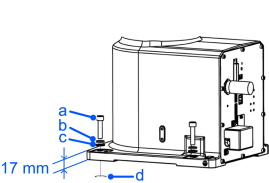
| Symbol | Description |
|---|---|
| a | 4-M8X35 |
| b | Spring washer |
| c | Plain washer |
| d | Threaded hole (18 mm or more depth) |
Cleanroom Specifications
When using the Manipulator in the clean room, follow the steps below before the installation.
- Unpack the Manipulator outside of the cleanroom.
- Secure the Manipulator to transporting equipment (or a pallet) with bolts so that the Manipulator does not fall down.
- Wipe off any dust on the Manipulator using a lint-free cloth that was dipped in ethyl alcohol or distilled water.
- Carry the Manipulator into the cleanroom.
- Secure the Manipulator to the base table.