Connection Example
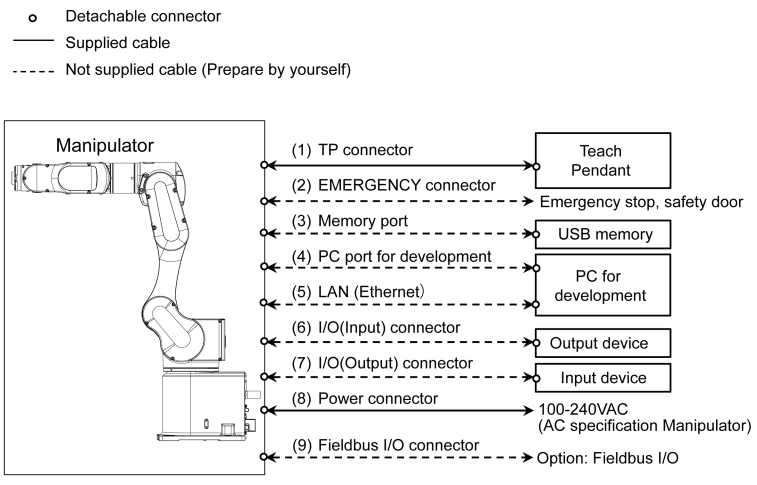
TP connector
Connect the Teach Pendant (option).
For details, refer to the following.
TP PortEMERGENCY connector
Connects the emergency stop switch and the safeguard switch.
For safety reasons, connect the proper switches for these input devices. For details, refer to the following.
EMERGENCY connectorMemory Port
Connect to USB memory. For details, refer to the following.
Memory PortPC port for development
Connects the PC for development For details, refer to the following.
Development PC Connection PortLAN (Ethernet Communication)
Connect the EtherNet cable. For details, refer to the following.
LAN (Ethernet Communication) PortI/O (Input) connector
This input connector is for the user’s output device. When there is an output device, use this connector. For details, refer to the following.
Standard I/O ConnectorI/O (Output) Connector
This output connector is for the user’s input device. When there is an input device, use this connector. For details, refer to the following.
Standard I/O ConnectorPower connector
Connector for supplying AC power source (AC specification Manipulator).Fieldbus I/O connector
EMC measures should be implemented for the Fieldbus I/O cables as needed. For details, refer to the following section.
Key Points for Noise Reduction
When the Manipulator is a model with cleanroom specifications, an exhaust system must be connected. For details on the exhaust system, refer to the following.
Appendix A: Specifications Table