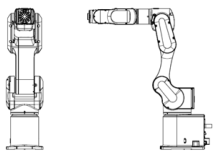
Checking the Basic Orientation
After installing the Manipulator and setup the operating environment, check if it moves to the basic position properly.
Follow the steps below to set the basic orientation of the Manipulator shown below as the origin position.
Start Epson RC+.
Double click the [Epson RC+] icon on the desktop.Open the command window.
Epson RC+ menu-[Tools]-[Command Window]Execute the following command in [Command Window].
>Motor On
>Go Pulse (0,0,0,0,0,0)
If the Manipulator cannot be in the basic orientation shown below, please contact the supplier.