Sequence - Create Mode
In sequence creation mode, you can use the functions necessary to register a sequence. Each action can have up to seven settings: type, operation, mode, and time value.
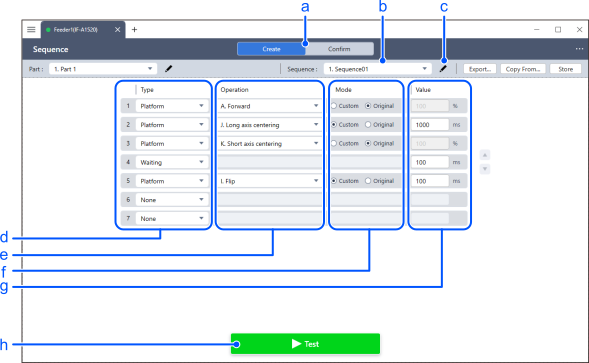
| Item | Description | |
|---|---|---|
| a | [Create]/[Confirm] | Select a mode to create or review a sequence. |
| b | Selecting the Sequence | Select the sequence number you want to create from 01 to 26. Sequence number 26 contains sample actions and is read-only. |
| c | Edit sequence name | You can name the sequence. |
| d | Type | Select the type of operation. See the key points below for details. |
| e | Operation | Select the details of the operation. See the key points below for details. |
| f | Mode | Select how to specify the duration of the operation.
|
| g | Value | Sets the duration. This option is available when [Custom] is selected in the [Mode]. |
| h | Test | The selected sequence will be executed. |
KEY POINTS
The operations you can select for each action type are as follows:
| Action type | Available operations |
|---|---|
| None | You cannot select an operation. |
| Platform Vibration | Select Action A-Z. |
| Output Activation | Select [Hopper 1] or [Hopper 2]. |
| Wait Time | You can enter a waiting time in [Value]. |
| Purge Gate | Select [Open] or [Close]. |