Digital I/O
You can check the status of digital I/O available on the IF-A series using Epson Feeder Configurator. For detailed specifications of the digital I/O, refer to the following.
Use in Combination with a PLC
Digital I/O is primarily controlled by devices such as PLCs that control I/O ports. Because it operates via I/O ports rather than being controlled by commands such as Ethernet, it offers intuitive control and reduced latency. However, debugging port control is not directly visible. This function allows you to check the status.
The digital I/O function not only allows you to check the input/output but also records it in a log file. Using the log file makes debugging easier.
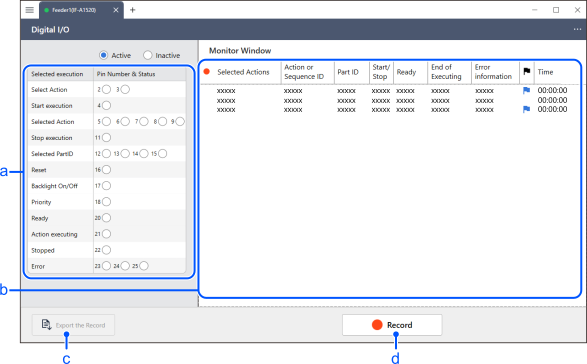
| Item | Description | |
|---|---|---|
| a | I/O Port Status Display | Displays the input and output of I/O ports in real time. The display is separated by function, allowing you to check active I/O on a function-by-function basis. |
| b | Monitor Window | This window allows you to check the input and output of the I/O ports. It decodes and displays the I/O port information, allowing you to see how it is operating. |
| c | Export the Record | The log information recorded by clicking the [Record] button will be written to a text file. |
| d | Record | This button starts recording the I/O port information displayed in the monitor window. Writing to a log file allows you to review digital I/O control later. |