Vibration - Confirm Mode
In [Confirm] mode, you can efficiently verify the parameters set in [Adjust] mode. In continuous testing mode, you can verify not just one action, but multiple specified actions in sequence.
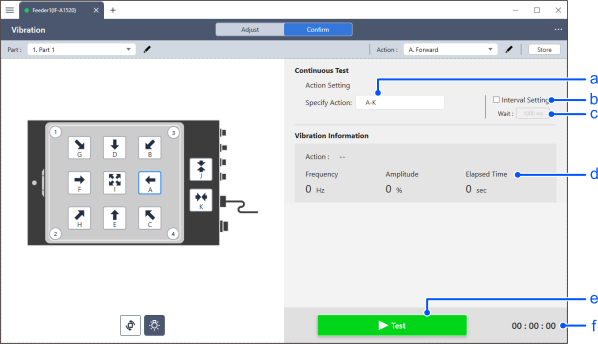
| Item | Description | |
|---|---|---|
| a | Action Setting | Specify the action you want to check. The actions can be specified in the following format:
|
| b | Interval Setting | To set the switching interval of the action you want to monitor, check the check box. If you uncheck the check boxes, each action will be executed sequentially. |
| c | Wait | When the [Interval Setting] checkbox is selected, you can set the pause time when switching actions. |
| d | Vibration Information | Displays information about the currently running action. |
| e | Test | The confirmation of the specified sequence of actions will begin. After it starts, the button will switch to a stop button. |
| f | Elapsed Time | This displays the elapsed time since the start of the test. |