Device Setting - Backlight
The color and brightness of the backlight built into the feeder unit can be set for each individual part. For example, you can switch the backlight settings for each part, such as setting one part to white with 50% brightness and another part to red with 60% brightness.
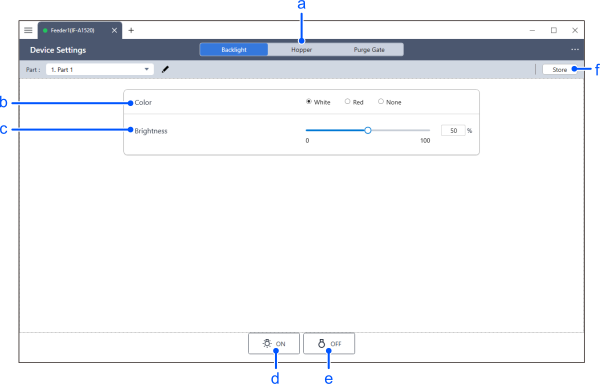
| Item | Description | |
|---|---|---|
| a | Selecting the device | Select the device you want to configure from Backlight, Hopper, and Purge Gate. |
| b | Color | Select the backlight color. |
| c | Brightness | Specify the backlight brightness using a slider or text box. Setting range: 0 to 100 [%] |
| d | ON | Turns the backlight on. |
| e | OFF | Turns the backlight off. |
| f | Store | During normal adjustment procedures, the adjusted parameters are not saved to the non-volatile memory within the feeder unit. Pressing the [Store] button will write the data to the device. |