System Setting - Setting Mode
In [Setting] mode, you can configure network settings and the post-operation delay.
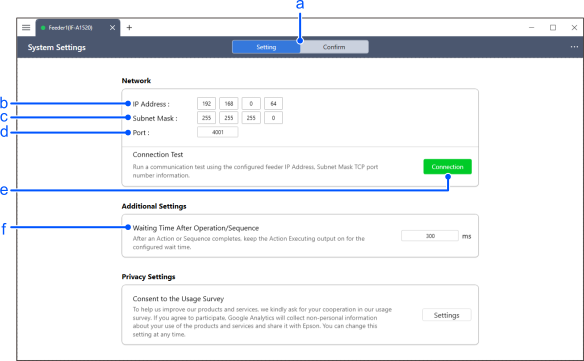
| Item | Description | |
|---|---|---|
| a | [Setting]/[Confirm] | Select the mode to configure or the mode to verify. |
| b | IP Address | Specify the IP address of the feeder unit. Only private IP addresses can be used for IF-A series feeders. |
| c | Subnet Mask | Specify the subnet mask. |
| d | Port | Specify the TCP port number. |
| e | Connection Test | Clicking the [Connection Test] button will test the communication between the feeder unit and the Epson Feeder Configurator according to the specified network settings. |
| f | Wait time after operation/sequence | Specifies the wait time before turning OFF the [In Operation] signal of the Digital I/O connector mounted on the feeder unit after executing a movement action or sequence. |
KEY POINTS
The initial network settings are as follows:
- IP address: 192.168.0.64
- Subnet mask: 255.255.255.0
- Port number: 4001
When controlling the IF-A Series from an external device such as a PLC, excessive operating signals may cause the unit to not operate correctly. In this case, operation may improve if you set a wait time in [Wait time after operation/sequence].
The Action Executing (Out1) signal changes as follows.
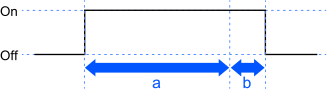
- a: Movement action or hopper/purge gate operation execution
- b: Wait time after operation/sequence
When executing a sequence, the [Wait time after operation/sequence] is added to the end of the sequence. It cannot be inserted between operations in the sequence.
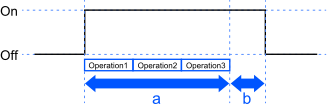
- a: Sequence execution
- b: Wait time after operation/sequence
Specify "0" if [Wait time after operation/sequence] is not required.
[Wait time after operation/sequence] is saved separately from the vibration set containing the vibration and backlighting parameters. It can be imported and exported separately, independent of the vibration set.