Device Setting - Purge Gate
This page allows you to check the optional purge gate settings and run testing. You can configure whether or not to use a purge gate.
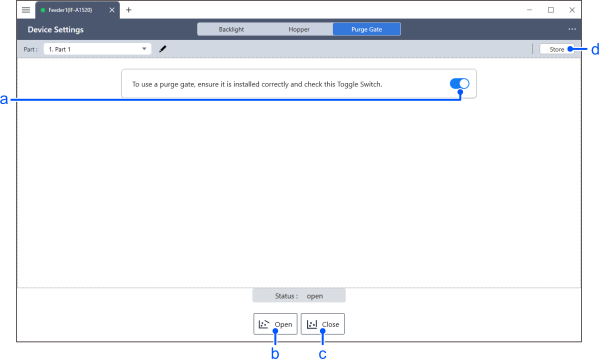
| Item | Description | |
|---|---|---|
| a | Purge Gate Connection Status | This setting determines whether a purge gate is installed. Ensure the purge gate is correctly connected before turning it on. |
| b | Open | Open the purge gate. |
| c | Close | Close the purge gate. |
| d | Store | During normal adjustment procedures, the adjusted parameters are not saved to the non-volatile memory within the feeder unit. Pressing the [Store] button will write the data to the device. |
KEY POINTS
- The state of the purge gate is indicated by the output of the close sensor attached to the purge gate unit. If the purge gate is even slightly open, the close sensor does not detect that the purge gate is closed and [opened] is displayed.
- The vibration, backlighting, hopper and purge gate parameters are saved as a single vibration set for each part. When importing or exporting parameters, all parameters are input and output at the same time.