PG Robot Parameters Overview
To configure parameters for a PG robot:
Start Epson RC+.
Select [Setup]-[System Configuration]-[Controller]-[Robots].
Select a PG parameter of the PG robot you want to edit the setting.

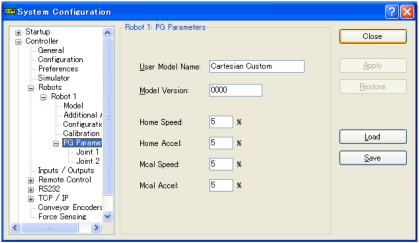


Follow the instruction in the following and follows to change the parameter settings. Click [Apply] to save the new settings.
CAUTION
Set PG robot parameters with extra caution.
If parameters are set improperly, the robot may move unexpectedly. The unexpected movement of the robot is extremely hazardous and may cause damage to the robot and / or peripheral equipment.