PG Parameters
If you have a PG robot data file previously created
Load the data file by following the instruction in the following.
Backup and Restore Parameter Data - [Backup and Restore Parameter Data]
If you don’t have a data file
Set the PG robot parameter in the dialog shown below.

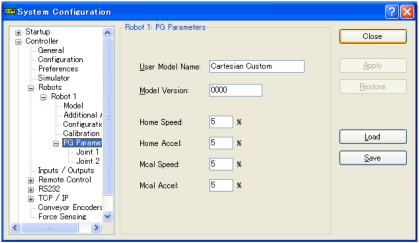


User Model Name
Name the model of the manipulator here. You may create your own type-name using a maximum of 32 alphanumeric characters.
The User Model Name entered here will appear as the robot type in Robot Configuration. The User Model Name does not affect robot operation.
Model Version
This indicates the data version in a 4-digit hexadecimal number. This information does not affect robot operation. The version number is for your own use to indicate different versions of robots using the same User Model Name.
Home Speed
This parameter sets the speed when Home is executed, specified by percentage of maximum speed.
The value must be an integer in the range of 1 to 100.
Home Accel
This parameter sets the acceleration when HOME is executed, specified by percentage of maximum acceleration.
The value must be an integer in the range of 1 to 100.
Mcal Speed
This parameter sets the speed when MCAL is executed, specified by percentage of maximum speed.
The value must be an integer in the range of 1 to 100.
Mcal Accel
This parameter sets the acceleration when MCAL is executed, specified by percentage of maximum acceleration. The value must be an integer in the range of 1 to 100.
KEY POINTS
Specify this parameter so that MCAL is completed within 120 seconds.
If the calibration of each joint is not completed within 120 seconds during MCAL execution, then error 4083: MCAL did not complete in time will occur.