PG parameter Joint


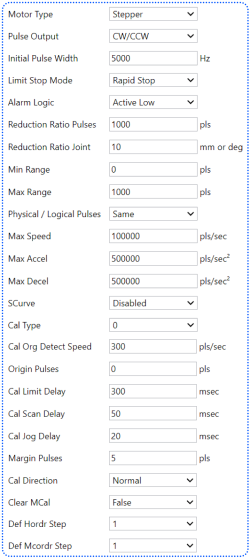
Motor Type
Specifies the target motor type. Select either Servo or Stepper.
If Servo is selected, the following signals will become effective: Positioning Output of the servo drive (DEND), Counter Reset Input (DRST) and Servo ON (SVON).
Pulse Output
Select the pulse output type from the drop-down list to match to the motor drive’s specification:
| Pulse / Direction | For this setting, the pulse signal is generated from the CWP output while the Direction signal will be generated from the CCWP output. The direction will be + (CW) when CCWP is low, and \– (CCW) when CCWP is high. |
| CW / CCW | For this setting, the pulse in + (CW) direction is generated from the CWP terminal while the pulse in \– (CCW) direction will be generated from the CCWP terminal. |
Initial Pulse Width
Use this parameter to control the initial pulse width to prevent power swing at the stepper motor. The value must be an integer in the range of 1 to 8388607.
Limit Stop Mode
This specifies how the robot will be stopped when a limit signal is turned OFF. Select from the drop-down list box either Rapid Stop (stop immediately) or Decel Stop (gradually decelerate to stop).
Alarm Logic
The ALM input logic is defined as follows when you select either Active High or Active Low from the drop-down list:
| Active High | The alarm status is active when the input at the ALM input terminal is at High Active. |
| Active Low | The alarm status is active when the input at the ALM input terminal is at Low Active. |
Reduction Ratio Joint, Reduction Ratio Pulses
This defines the number of pulses that correspond with the travel distance in millimeters or degrees.
This sets the pulse number to the reduction ratio pulse, travel distance (angle) to the reduction ratio joint.
Input range is an integer from 1.0 ~ 1000000.0.
Max Range, Min Range
This is the default working range for the robot.
The value must be a signed integer in the range of -2147483648 to 2147483647.
When the user clicks the [Defaults] button in [Tools]-[Robot manager]-[Range], these values will be used. Refer to the following for more details.
Physical / Logical Pulses
Set the relation of the direction of the motor rotation and the pulse values (coordinate values) in SPEL+. Select Same or Reverse from the drop-down list.
| Same | As physical encoder values increase, SPEL+ pulse values increase. |
| Reverse | As physical encoder values increase, SPEL+ pulse values decrease. |
Z Joint
Specify the joint designated as Z-joint (vertical operation joint) when the JUMP command is executed in SPEL+. For Cartesian robots, the Z joint is fixed at joint #3.
Max Accel, Max Decel Max, Speed
These correspond with the SPEL+ commands SPEED 100, and ACCEL 100, 100, whose values are percentages.
| maximum speed [pulse/sec] | Real value from 0.1 to 6553400.0 |
| maximum acceleration [pulse/sec2] | Real value from 200.0 to 400000000.0 |
| maximum deceleration [pulse/sec2] |
SCurve
This sets the acceleration speed curve to Straight or S-curve Acceleration/Deceleration.
| Disabled | Straight Acceleration/Deceleration (Default) |
| Enabled | S-curve Acceleration/Deceleration In the S-curve Acceleration/Deceleration, it creates an acceleration/decelerat ion curve which changes the speed smoothly. Also, it can prevent the triangle drive in small distance motions. |
Relative Motion
This enables the relative rotary motion in any directions. This is used to control such as the rotary index. This is for only the Joint type robots.
| Disabled | Relative motion is not enabled (Default) |
| Enabled | Relative motion is enabled When the relative motion is enabled, normal absolute position management is not executed. The point data for the motion command is considered as the relative travel amount from the current position. Go XY(100, 0, 0, 0) ‘ Moves 100 mm or 100 degrees from the current position. |
Continuous Motion
Enables the continuous rotation in the any direction. This is used in the rotary table or other controls. This is for only the Joint type robots.
| Disabled | Continuous operation is not enabled (Default) |
| Enabled | Continuous operation is enabled If the continuous operation is enabled, normal absolute position management is not executed. In addition, only the motion commands for the continuous rotation (PG_Scan, PG_SlowStop, PG_FastStop) are enabled and the manipulator will not move with other motion commands. PG_Scan 0 : Continuous motion in CW direction. |
Cal Type ORG
The Calibration Type specifies the calibration method used to calibrate the mechanical origin.
There are seven calibration types 0, 1, 2, 3, 4, 5 and 10. Refer to the following for more details.
Cal Org Detect Speed
This is the speed for detecting the sensor edge in pulses/sec. The value must be an integer in the range of 1 to 65535.
Origin Pulses
Specifies the pulse position after the calibration.
The specified pulse value is the position at where the arm is after the calibration with MCal. The value must be a positive / negative integer.
Cal Limit Delay
The Limit Delay sets the time duration (in msec) before reverse motion starts after either the CCW or CW Limit is detected during calibration. The value must be an integer in the range of 0 to 1275 and a multiple of 5 (msec).
Cal Scan Delay
The Scan Delay sets the time duration (in msec) before reverse motion starts after the stop command is input during calibration. The value must be an integer in the range of 0 to 1275 and a multiple of 5 (msec).
Cal Jog Delay
The Jog Delay sets the delay (in msec) per pulse for the low speed, pulse-by-pulse operation during signal detection. The value must be an integer in the range of 0 to 1275 and a multiple of 5 (msec).
Margin Pulses
During the calibration without the acceleration or deceleration, when the calibration signal is detected, the arm stops after moving for the part of margin pulses in the traveling direction. This is used to prevent the false detection by the origin signal chattering or hunting. The value must be an integer in the range of 0 to 65535.
Cal Direction
This setting defines the direction for the joint to move when calibrating the mechanical origin:
| Normal | The joint moves in the normal direction during calibration of the mechanical origin. |
| Reverse | The joint moves in the reverse direction during calibration of the mechanical origin. |
Clear MCal
The check on this box clears the existing MCAL records when either MOTOR OFF or SFREE is executed. Execution of either MOTOR OFF or SFREE necessitates execution of MCAL after the motor is let go of servo by either of these commands.
| False | The MCAL records will not be cleared when either MOTOR OFF or SFREE is executed. If it is a stepping motor that is driving the joint, this box must be left unchecked. |
| True | The MCAL records will be cleared when either MOTOR OFF or SFREE is executed. Execution of either MOTOR OFF or SFREE necessitates execution of MCAL after the motor is let go of servo by either of those commands. If it is a servo motor connected to the SVON output that is driving the joint, this box must be checked. |
Default Horder
When HOME (a command to move to the user-defined home position) is executed, each joint will be moved to the user-defined home position in the order as specified by the HORDR command. When the user clicks the [Defaults] button in the [Tool] - [Robot manager] - [Home Config], these values will be used.
Refer to the following for more details.
Default MCORDR
When MCAL (calibration to the home position) is executed, each joint will be calibrated to the mechanical home position in the order as specified by the MCORDR command. When the user clicks the [Defaults] button in the [Tool] - [Robot manager] - [Mcal Order], these values will be used.
Refer to the following for more details.