Real-time Motion Control
Real-time motion control allows external control of the robot or controller via Ethernet. In particular, it enables robot control with a motion control value based on an externally planned route/trajectory. This makes it possible to create an application using the function of performing route planning/trajectory planning outside the controller.
Use the client library provided by Epson on an external device to use this function. For details on the client library, refer to the URL below.
https://github.com/Epson-Robots/rtmc-client-library.git (opens new window)
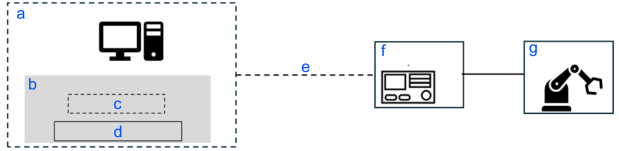
 : To be prepared by the customer
| Symbol | Description |
|---|---|
| a | External device |
| b | Software |
| c | Application |
| d | Client library |
| e | Ethernet cable |
| f | RC800-A |
| g | Robot |
For details about the supported models, see readme in the client library.
https://github.com/Epson-Robots/rtmc-client-library.git (opens new window)
Limitations
This function cannot be used together with the following operations and functions:
- SPEL+ program execution
- Option control such as the force sensor, vision system, part feeder, PG, etc.
- Usage as a status monitor of the Remote Ethernet
- OPC UA
This function also does not work for:
- Controllers other than the RC800 series (firmware version 8.1.1.0 or later)
- Robots connected to a drive unit (DU)
- Virtual Controller
KEY POINTS
Epson does not provide the function for performing route planning/trajectory planning. The customer must prepare or develop it.
This function enables the operation of the robot according to the motion control value based on the route/trajectory planned outside the controller. Use route planning/trajectory planning after thorough understanding.
For enhanced security, a connection password must be set when connecting Controllers and PCs. For details on connection passwords, see below.