Setting Real-time Motion Control
Set real-time motion control according to the procedure described below.
KEY POINTS
To make these settings, you will need Epson RC+ 8.0 Ver. 8.1.1.0 or later.
The [System Configuration] command opens a dialog that contains several pages that are used to configure the system for the Epson RC+ 8.0 environment. Select [Controller]-[Remote]-[Real-time Motion Control].
Set the password.
Set each item.
Click the [Apply] button to save the new setting, then click the [Close] button.
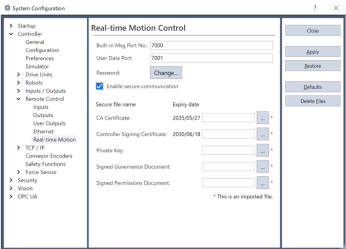
Item Description Port number for built-in messages Specifies the port number for built-in messages (Optional)
Use it to change the port number from the default value. (*1)Port number for user data Specifies the port number for user data. (Optional)
Use it to change the port number from the default value. (*1)Password Set the password. (Optional)
You can set up to 16 characters. When you do not enter any character, the no-character state is applied as the password.Enable secure communication Select this item to secure communication between the controller and the external device. (Optional) CA Certificate (*2) Set the CA certificate file to be imported to the controller. (*3) Controller Signing Certificate (*2) Set the controller signing certificate file to be imported to the controller. (*3)
The file to be set must be signed by the certification authority corresponding to [CA Certificate].Private Key (*2) Set the private key file to be imported to the controller. (*3)
This must be imported as a pair together with the [Ctrl Sig. Cert].Signed Governance Document (*2) Set the governance document file to be imported to the controller. (*3)
This must be signed by the certification authority corresponding to the imported [CA Certificate].Signed Permissions Document (*2) Set the permissions document file to be imported to the controller. (*3)
This must be signed by the certification authority corresponding to the imported [CA Certificate].Defaults The items below have the default value. - Port number for built-in messages
- Port number for user data
- Password
Delete File Delete the following files imported to the controller. - CA certificate
- Controller Signing Certificate
- Private key
- Signed governance document
- Signed permissions document
*1: During communication of real-time motion control, the user data and meta data are communicated through separate ports.
*2: If [Enable secure communication] is selected, the file imported to the controller will be applied. Create the file to be set in [CA Certificate], [Controller Signing Certificate], and [Private Key] using OpenSSL. The pre-signed files of [Signed Governance Document] and [Signed Permissions Document] are created by executing create_secfile.py from the URL below. Use OpenSSL to sign this file and then use it.
https://github.com/Epson-Robots/rtmc-client-library/script (opens new window)
When you run this script file, the folder below will be created and the required secure files will also be created. When using the secure files created by this script in the setting items of this screen, use the secure file for the controller.
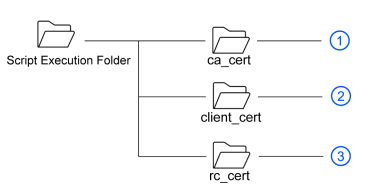
Number File Name Description 1 ca_cert_example.pem Self-signed certificate of a private certification authority
(Used with both the Linux PC applications and the controller)ca_private_key_example.pem Private key of a private certification authority 2 client_cert_example.pem Signing certificate for Linux PC applications client_private_key_example.pem Private key for Linux PC applications client_governance_example.smime Governance Document for Linux PC applications client_permissions_example.smime Permissions Document for Linux PC applications 3 rc_cert_example.pem Signing certificate for the controller rc_private_key_example.pem Private key for the controller rc_governance_example.smime Governance document for the controller rc_permissions_example.smime Permissions document for the controller OpenSSL is opensource software. For details, see the OpenSSL website.
*3: It is necessary to set this item when [Enable secure communication] is selected. It is not necessary to set this item when [Enable secure communication] is not selected.