Setting the Mechanical Stops of Joints #3
Turn ON the Controller and turn OFF the motors using the Motor OFF command.
Push up the shaft while pressing the brake release switch.
KEY POINTS
Do not push the shaft up to its upper limit or it will be difficult for the arm top cover to be removed. Push the shaft up to a position where the Joint #3 mechanical stop can be changed.
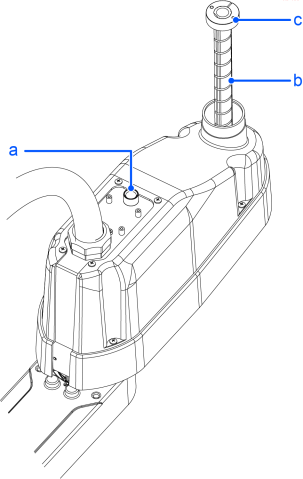
Symbol Description a Brake release switch b Shaft c Lower limit mechanical stop mounting screw M4 × 15 When you press the brake release switch, the shaft may lower or rotate due to the weight of the hand. Be sure to hold the shaft by hand while pressing the switch.
Turn off the Controller.
Loosen the lower limit mechanical stop screw (M4 × 15).
KEY POINTS
A mechanical stop is mounted on both the top and bottom of Joint #3. However, only the position of the lower limit mechanical stop on the top can be changed. Do not remove the upper limit mechanical stop on the bottom because the origin point of Joint #3 is determined by the stop.
The upper end of the shaft defines the position of the maximum stroke. Move the lower limit mechanical stop down by the length that you want to limit the stroke.
For example, when the lower limit mechanical stop is set at the "200 mm" stroke, the lower limit Z coordinate value is "-200". To change this value to "-180", move the lower limit mechanical stop down by "20 mm". Use calipers to measure the distance when adjusting the mechanical stop.
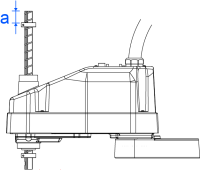
Tighten the lower limit mechanical stop screw (M4 × 15).
Recommended tightening torque: 5.4 N m (55 kgf cm)
Turn ON the Controller.
Press down Joint #3 while pressing the brake release switch, and then check the lower limit position.
Do not lower the mechanical stop too far. Otherwise, the joint may not reach a target position.Calculate the lower limit pulse value of the pulse range using the formula shown below and set the value.
The result of the calculation is always negative because the lower limit Z coordinate value is negative.
Lower limit of pulse (pulse) = lower limit Z coordinate value (mm) / Joint #3 Resolution* (mm/pulse)
* For Joint #3 resolution, refer to the following.
Appendix B: Stopping Time and Stopping Distance at Emergency Stop

Execute the following commands from the [Command Window]. Enter the calculated value in X.
>JRANGE 3,X,0 ' Sets the pulse range of Joint #3Using the Pulse command (Go Pulse command), move Joint #3 to the lower limit position of the pulse range at low speed.
If the mechanical stop range is less than the pulse range, Joint #3 will hit the mechanical stop and an error will occur. When an error occurs, either change the pulse range to a narrower setting or extend the position of the mechanical stop within the limit.
KEY POINTS
If it is difficult to check whether Joint #3 hits a mechanical stop, turn OFF the Controller and lift the arm top cover to check the condition causing the problem from the side.
Execute the following commands from the [Command Window]. Enter the value calculated in Step (9) in X.
>MOTOR ON	    '	Turns On the motor
>SPEED 5	    '	Sets at low speed
>PULSE 0,0,X,0	'	Moves to the lower limit-pulse position of Joint #3
(In this example, all pulses except those for Joint #3 are “0”. Substitute these “0s” with the other pulse values specifying a position where there is no interference even when lowering Joint #3.)