For RC800 series:
| Remote command | Parameter | Contents | Input acceptance condition (*1) |
|---|---|---|---|
| Login | Password | Start the Controller Remote Ethernet function Authentication by password Execute Login correctly, commands execution is enabled until Logout | Available any time (*2) |
| Logout | Exit Controller Remote Ethernet function After Logout, execute the Login command to start remote Ethernet function. Logout during task execution causes an error. | Available any time (*2) | |
| Start | Function No. | Execute the function of specified number (*3) (*11) | Auto ON Ready ON Error OFF EStop OFF Safeguard OFF |
| Stop | Stop all tasks and commands | Auto ON | |
| Pause | All tasks are paused. (*4) | Auto ON Running ON | |
| Continue | Continue paused tasks | Auto ON Paused ON | |
| ContinueManualRestart | Continues the paused task. (Automatically recovers) | Auto ON Paused ON | |
| Reset | Resets emergency stop and error. (*5) | Auto ON Ready ON | |
| SetMotorsOn | Robot number | Turn ON the robot motor (*6)(*7) | Auto ON Ready ON EStop OFF Safeguard OFF |
| SetMotorsOff | Robot number | Turn OFF the robot motor (*7) | Auto ON Ready ON |
| SetCurRobot | Robot number | Select the manipulator | Auto ON Ready ON |
| GetCurRobot | Acquires the current manipulator number | Available any time (*2) | |
| Home | Robot number | Move the arm to home position defined by user | Auto ON Ready ON Error OFF EStop OFF Safeguard OFF |
| GetIO | I/O bit No. | Acquire the specified I/O bit | Available any time (*2) |
| SetIO | I/O bit No. & value | Set the I/O specified bit 1: Turn ON the bit 0: Turn OFF the bit | Ready ON |
| GetIOByte | I/O port No. | Acquire the specified I/O port (8 bit) | Available any time (*1) |
| SetIOByte | I/O port No. & value | Set the I/O specified port (8 bit) | Ready ON |
| GetIOWord | I/O word port No. | Acquire the specified I/O word port (16 bit) | Available any time (*2) |
| SetIOWord | I/O word port No. & value | Set the I/O specified word port (8 bit) | Auto ON Ready ON |
| GetMemIO | Memory I/O bit No. | Acquire the specified memory I/O bit | Available any time (*2) |
| SetMemIO | Memory I/O bit No., value | Set the specified memory I/O bit 1: Turn ON the bit 0: Turn OFF the bit | Auto ON Ready ON |
| GetMemIOByte | Memory I/O Port number | Acquire the specified memory I/O port | Available any time (*2) |
| SetMemIOByte | Memory I/O port No., value | Set the specified memory I/O port (8 bit) | Auto ON Ready ON |
| GetMemIOWord | Memory I/O word port No. | Acquire the specified memory I/O word port (16 bit) | Available any time (*2) |
| SetMemIOWord | Memory I/O word port No., value | Set the specified memory I/O word port (16 bit) | Auto ON Ready ON |
| GetVariable | Parameter name{,type} | Acquire the value of backup (Global Preserve) parameter (*8) | Available any time (*2) |
[Parameter name] (Array element), [Parameter name type], [Number to acquire] | Acquire the value of backup (Global Preserve) array parameter (*9) | ||
| SetVariable | Parameter name,value{, type} | Set the value in the backup (Global Preserve) parameter (*8) | Auto ON Ready ON |
| GetStatus | Acquire the Controller state | Available any time (*1) | |
| Execute | Command Working with strings | Execute the command (*10)(*11)(*12) | Auto ON Ready ON Error OFF EStop OFF Safeguard OFF |
| Abort | Abort the command execution | Auto ON | |
| ResetCtrlParts | Parts number | Maintenance (Controller parts reset) | Available any time (*1) |
| ResetRbParts | Robot number,parts number | Maintenance (robot parts reset) | Available any time (*1) |
*1: The Controller state bit from GetStatus.
*2: "Available any time" is applicable if the following conditions are met.
- When "Remote Ethernet" is set as the control device, or,
- "Remote Ethernet" is not set as the control device, but set to be used for monitoring.
*3: Execute the function specified in the Main[Function No.].
| Function Name | Function No. |
|---|---|
| Main | 0 |
| Main1 | 1 |
| Main2 | 2 |
| Main3 | 3 |
| Main4 | 4 |
| Main5 | 5 |
| Main6 | 6 |
| Main7 | 7 |
| ⋮ | ⋮ |
| Main63 | 63 |
*4: Pause command is not available for "NoPause task" and "NoEmgAbort task".
For details, refer to Help or the following manual:
"SPEL+ Language Reference- Pause""
*5: I/O output will be turned off and the robot parameter will be initialized.
For details, refer to Help or the following manual:
"SPEL+ Language Reference- Reset""
*6: The robot parameter will be initialized.
For details, refer to Help or the following manual:
""SPEL+ Language Reference- Motor""
*7: When 0 is specified for the manipulator number, all the manipulator will be operated
If you wish to operate particular manipulator, specify the manipulator number (1 to 16) of the target manipulators.
*8: Parameter type means {Boolean | Byte | Double | Integer | Long | Real | String | Short | UByte | UShort | Int32 | UInt32 | Int64 | Specify UInt64}
Type specified: for the backup parameters when the parameter name and type are same.
Type not specified: for the backup parameters when the parameter names are same.
*9: For the array element, specify an element you acquire as the following:
You need to specify an element when acquiring from the head of the array.
| 1D array | Parameter name (0) | Acquire from the head. |
| Parameter name (Element number) | Acquire from the specified element number. | |
| 2D array | Parameter name (0.0) | Acquire from the head. |
| Parameter name (Element number 1, 2) | Acquire from the specified element number. | |
| 3D array | Parameter name (0,0,0) | Acquire from the head. |
| Parameter name (Element number 1, 2, 3) | Acquire from the specified element number. |
- You cannot omit the parameter type and number to acquire.
- You cannot specify a string for the parameter type.
- Available number to acquire is up to 100.
- If you specify a number over the number of array elements, you have an error.
For example:
$GetVariable,gby2(3,0),Byte,3
It acquires values of gby2(3,0), gby2(3,1), gby2(3,2) of Byte type 2D array parameter gby2.
*10: Specify the command and parameters in double quotation marks (" ").
Command strings to be executed are restricted to 256 bytes, and execution result strings are restricted to 4060 bytes.
Robot motion command will be executed to the selected manipulator. Check which robot is selected by using GetCurRobot before command execution.
Following commands are available while Execute is running.
Commands available while Execute is running
Remote command
- Abort
- GetStatus
- SetIO
- SetIOByte
- SetIOWord
- SetMemIO
- SetMemIOByte
- SetMemIOWord
When the commands specified in (SetIO, SetIOByte, SetIOWord, SetMemIO, SetMemIOByte, SetMemIOWord) are the same and executed at the same time, the command executed later will result in error. Make sure to check the execution result by using GetStatus after the execution of Execute command and output command which the Execute command is being executed.
*11: To execute commands including PC function (PC file, PC RS-232C, Database access, DLL calling), be sure to execute while the Epson RC+ 8.0 is connected. If the Epson RC+ 8.0 is not connected, command execution will result in error.
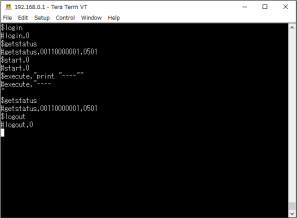
*12: "Command string" parameter of Execute command encloses in (" ") (double quotation marks). If the parameter includes (" "), refer to the following execution example. In SPEL+ language, Chr$(34) is used for (" ") (double quotation marks). Refer to #Print in SPEL+ Language Reference.
Example: TeraTerm
(New-line Receive: AUTO, Transmit: CR+LF, Local echo: ON)