SF_LimitSpeedS
Sets and displays the speed adjustment value for the function that adjusts the speed at the position set by the Tool command when Safety Limited Speed (SLS) is enabled.
Syntax
SF_LimitSpeedS [SLS number [, speed adjustment value]]
Parameters
- SLS number
- Specify the SLS number as an integer value or as a constant as shown below. Optional.
Constant Value Description SLS_1 1 Sets and displays the speed adjustment value when SLS_1 is enabled. SLS_2 2 Sets and displays the speed adjustment value when SLS_2 is enabled. SLS_3 3 Sets and displays the speed adjustment value when SLS_3 is enabled. SLS_T 9 Displays the speed adjustment value when SLS_T is enabled. *1 SLS_T2 10 Displays the speed adjustment value when SLS_T2 is enabled. *1 - *1 For SLS_T and SLS_T2, you cannot set the speed adjustment value with this command. The speed is adjusted at the monitored speed set in Safety Function Manager. For more information, refer to the following manual:
"Robot Controller Safety Function Manual" - speed adjustment value
- Specify the speed as an integer value (0 to 10000, unit: mm/s). Optional. If 0 is specified, the speed adjustment value is set automatically. The initial value is 0.
Description
Set the velocity adjustment value [mm/s] for the specified SLS number. If the second parameter is omitted, the speed adjustment value of the specified SLS number will appear.
If all parameters are omitted, the speed adjustment value of all SLS numbers will appear.
It is available only when Safety Function Options are activated.
Targets of speed adjustment
When Safety Limited Speed (SLS) is enabled, the speed of the parts marked with a ✓ is adjusted.
You can select the parts to monitor the SLS speed for in the Safety Function Manager. However, the speed is adjusted according to the table below regardless of the settings in the Safety Function Manager.
SCARA robot
SLS monitorable part *1 Not subject to SLS monitoring Hand Elbow Shaft end Tool position *2 PTP Motion ✓ ✓ ✓ ✓ CP Motion ✓ *1 See below for details.
"Robot Controller Safety Function Manual"*2 The tool position currently selected by the Tool command.
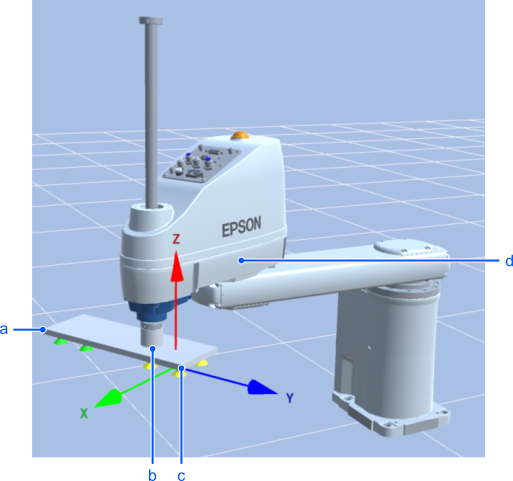
Symbol Description a Hand (SLS monitorable part) b Shaft end c Tool position d Elbow (SLS monitorable part) 6-axis robot
SLS monitorable part *1 Not subject to SLS monitoring Hand Elbow Wrist Shoulder Tool position *2 PTP Motion ✓ ✓ ✓ ✓ ✓ CP Motion ✓ *1 See below for details.
"Robot Controller Safety Function Manual"*2 The tool position currently selected by the Tool command.
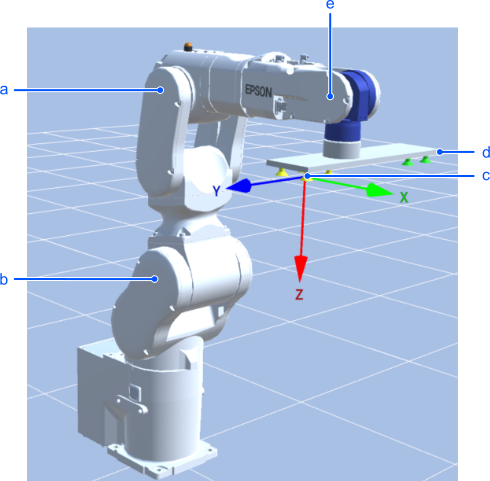
Symbol Description a Elbow (SLS monitorable part) b Shoulder (SLS monitorable part) c Tool position d Hand (SLS monitorable part) e Wrist (SLS monitorable part)
Note
SF_LimitSpeedSEnable cannot be used at the same time as singularity avoidance, conveyor tracking, and force control
SF_LimitSpeedSEnable is On by default. If you adjust the speed with this function during operation of singularity avoidance, conveyor tracking, or force control function, an operation error (4093, 4403, or 5830 respectively) occurs. Also, if SF_LimitSpeedSEnable is On, a 4500 error occurs at the start of conveyor operation.
When using SLS for these operations, set SF_LimitSpeedSEnable to Off before starting the operation. Also, use SF_PeakSpeedS and SF_RealSpeedS to measure the robot arm operation speed, and use Speed, SpeedFactor, SpeedS, etc. to control the robot arm operation speed so that it does not exceed the SLS monitored speed (safety function parameter).For CP motion, the part whose speed is adjusted by SF_LimitSpeedS is the currently selected tool position.
The position specified by the TCP offset of the Safety Function Manager is not automatically set in the Tool command. Use the Tool command to set the proper TCP location.This function does not guarantee that the Safety Limited Speed (SLS) monitoring speed will not be exceeded.
If the SLS monitoring speed is exceeded, use SF_PeakSpeedS and SF_RealSpeedS to measure the robot arm operation speed, and use Speed, SpeedFactor, SpeedS, etc. to control the robot arm operation speed so that it does not exceed the SLS monitored speed.
Tip
The speed adjustment value is 0 (automatic setting) when the controller starts up. We recommend leaving it at 0 for most situations.
In the case of PTP motions such as the Go command, when SLS is enabled, each part moves so as not to exceed the monitoring speed. In the case of CP motions such as the Move command, when SLS is enabled, only the tool position moves so as not to exceed the monitoring speed. If another part exceeds the SLS monitoring speed and an error occurs, use SpeedS or SpeedFactor, etc. to limit the speed.
SF_LimitSpeedS Example
How to set the SLS_1 speed adjustment value to 1500 mm/s.
SF_LimitSpeedS SLS_1, 1500
How to display the speed adjustment value for SLS_2 (using the command window)
> SF_LimitSpeedS SLS_2
SLS_2: 400
How to display the speed adjustment value for all SLS numbers (using the command window)
> SF_LimitSpeedS
SLS_1: 1500
SLS_2: 400
SLS_3: 750
SLS_T: 250
SLS_T2: 3000