STM Function
Returns point data with the orientation flags of the specified points converted to minimize operation time when the reference point is used as the starting point.
Syntax
STM(point [, refPoint [, mode]])
Parameters
- point
- Specify the target point data.
- refPoint
- Specifies the point data to be used as the reference. This value is optional. When the refPoint is not specified, the current position (Here) is used as the reference point.
- mode
- This value is optional.
- RS series
STM_H_MODE_FASTEST: When performing a Go motion from the reference point to the specified point, the orientation flags are adjusted to minimize the operation time. J1Flag, J2Flag and arm posture (Hand Flag) are changed. The values of the X, Y, Z, and U axes remain unchanged.
When multiple orientation flags result in the shortest operation time, the one with the least change in orientation flags is selected. - Other models
The STM function is not supported.
- RS series
Description
When the RS series robot moves to a point calculated by such as pallet or relative offsets, Arm #1 and Arm #2 may rotate to an unintended direction if the orientation flags are not specified correctly. Also, you won't know which orientation flag to select to minimize the operation time until you actually try it. The STM function prevents unintended arm rotation and appropriately converts the orientation flags of point data to minimize operation time. This is expected to shorten the takt time.
Consider PTP motion from point P0 to point P1 in the figure below. In the RS series, there are eight orientation flag selection patterns, based on combinations of J1Flag, J2Flag, and hand orientation. The red lines in the figure show the trajectory when moving from point P0 to point P1 corresponding to each orientation flag. The numbers at the bottom left of the figure indicate the operating time. The STM function operates toward the orientation flag that results in the shortest operation time among the multiple orientation flags. In the example shown in the figure below, the orientation flags for the lefty of No. 6, J1F0, and J2F1 are selected.
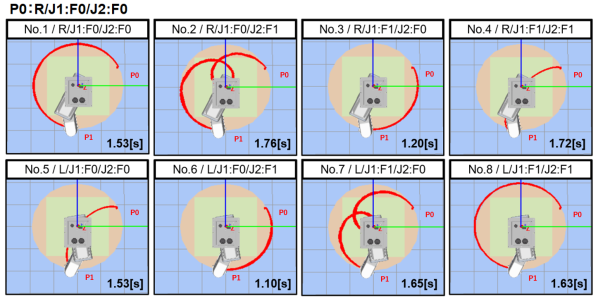
The operation time is calculated based on the Weight, Inertia setting value, and Speed, Accel setting when the function is executed. When you change these settings, the results of orientation flag conversion by the STM function may change. When testing the STM function, use the speed and acceleration settings for the actual environment.
Regardless of the power mode setting, SpeedFactor setting, and SLS speed adjustment value, the orientation flag conversion results by the STM function are not changed. When the power mode is Low, the orientation flags are converted based on the operation time calculated using the Speed and Accel settings before the power output is limited. The conversion results of the orientation flags do not change depending on whether it is in test mode or AUTO mode.
Orientation flags outside the pulse motion range are not selected.
Local numbers of the points returned by STM function are the same as that of “Point Expression”.
Notes
Wiring and device layout
When using the STM function, the hand orientation may be switched before and after the movement. When the hand orientation is switched, the arm moves in a folding motion, so pay attention to the wiring.
Also, make sure that the layout does not interfere with peripheral devices when the arm is switched to righty or lefty. The figure below shows an example of the behavior when the hand orientation is switched.

Errors due to differences in orientation flags
This command is intended for use in coarse positioning. When positioning the same point with righty or lefty, positional deviation may occur due to tool setting errors or calibration errors. For work that requires precise positioning, do not use this command, but use taught points.
See Also
Pallet Statement, AutoSTM, Power Statement, SpeedFactor Statement, Speed Statement, Accel Statement, Weight Statement, Inertia Statement, SF_LimitSpeedS
STM Function Example
The following program is an example of using the STM function with the RS series. It performs a reciprocating Jump between two points.
The hand orientation of P2 is defined for righty, but the STM function converts it to lefty, which results in the shortest operation time.
Function STM_Example1
	P1 = XY(150, 0, 0, 0)
	P2 = XY(-150, 0, 0, 0)
	Motor On; Power High;
	Speed 20; Accel 20, 20
	Weight 1.0; Inertia 0.005;
	Do
		Jump P1
		Print Here
		Jump P2
		Print Here
		Jump P1
		Print Here
		Jump STM(P2)
		Print Here
	Loop
Fend
The output results are as follows.
 X:  150.000 Y:    0.000 Z:    0.000 U:    0.000 V:    0.000 W:    0.000 /R /J2F0 /J1F0 /J1A(0.000) /0
 X: -150.000 Y:    0.000 Z:    0.000 U:    0.000 V:    0.000 W:    0.000 /R /J2F0 /J1F0 /J1A(0.000) /0
 X:  150.000 Y:    0.000 Z:    0.000 U:    0.000 V:    0.000 W:    0.000 /R /J2F0 /J1F0 /J1A(0.000) /0
 X: -150.000 Y:    0.000 Z:    0.000 U:    0.000 V:    0.000 W:    0.000 /L /J2F0 /J1F1 /J1A(0.000) /0